

Last Updated on 2026年2月25日 by Dr.Wall
StrongVPN is a trusted, long-established VPN service operated by J2 Global (a publicly listed U.S. company) since 2004. It delivers excellent reliability, strong security, fast speeds, and robust privacy features, making it a solid choice for users worldwide who prioritize performance and value.
This guide covers everything you need to know about StrongVPN, including company background, key advantages, registration process, and detailed installation/use instructions for all major platforms. Whether you're protecting privacy, securing public Wi-Fi, accessing global content, or enjoying smooth streaming/gaming, here’s the full overview:
- StrongVPN Company Overview
- Why Choose StrongVPN
- StrongVPN Registration & Signup Guide
- StrongVPN Windows Installation & Usage Tutorial
- StrongVPN Mac Installation & Usage Tutorial
- StrongVPN Android Installation & Usage Tutorial
- StrongVPN iPhone (iOS) Installation & Usage Tutorial
- StrongVPN Linux Installation & Usage Tutorial
- StrongVPN on Other Devices (Router, Smart TV, etc.)
- StrongVPN Common Issues & Troubleshooting
StrongVPN Company Overview
Founded in 2004 and managed by J2 Global (a reputable U.S.-based tech company), StrongVPN has over 20 years of experience providing secure, high-performance VPN services. While its primary market is the U.S., it offers global server coverage, strong encryption, a strict no-logs policy, and reliable apps for all major platforms.
Why Choose StrongVPN
- Fast & Stable Speeds — Excellent for streaming (Netflix, YouTube, Disney+), gaming, and downloads with minimal speed loss.
- Strong Security — AES-256 encryption, kill switch, DNS/IPv6 leak protection, and audited no-logs privacy.
- Value for Money — Competitive pricing, often lower than premium competitors, with PayPal support and a 1-day free trial.
- Wide Device Support — Apps for Windows, Mac, Android, iOS, Linux, routers, and more.
- Global Servers — Servers in 30+ countries for low-latency connections and content access.
- Easy to Use — Clean apps and straightforward setup, even for beginners.
why pick StrongVPN
- StrongVPN encrypts your internet traffic, making it nearly impossible for anyone to spy on your online activities.
- It hides your IP address to prevent third parties from tracking your location.
- StrongVPN creates a secure, private tunnel for your data, protecting your information from hackers and other cyber threats.
- With a wide range of server locations, you can easily find one that best suits your needs.
- StrongVPN uses the latest technology to ensure your connection is both secure and fast, giving you a worry-free browsing experience.
- Their customer support is available 24/7, so help is always just a click away whenever you need it.
- A money-back guarantee lets you try the service risk-free.
- StrongVPN offers easy-to-use apps for all major platforms, so you can stay protected on any device.
- You can connect up to 5 devices simultaneously with one account, keeping all your devices secure.
- StrongVPN is one of the most affordable VPN services on the market, making it one of the best choices available.
- It also features a fully localized Simplified Chinese interface, making it user-friendly for Chinese speakers.
Founded in 2004, StrongVPN is a product of the publicly traded U.S. company J2 Global. As the only VPN encryption software operated by a publicly listed company, StrongVPN stands out for its credibility and reliability. With a market capitalization of approximately USD 1.4 billion and over 17 years of operational history, StrongVPN is widely regarded as one of the most trustworthy VPN providers in the world.
Unlike smaller VPN providers or self-hosted SSR solutions, large companies like StrongVPN typically rely on high-speed encrypted nodes provided by top-tier cloud platforms such as Amazon Web Services, Google Cloud, and Oracle. These premium infrastructures offer greater stability and are far less likely to be blocked by firewalls, making StrongVPN a more reliable choice for bypassing internet restrictions.
Note: Below is a brief overview of StrongVPN’s advantages and features. For a more detailed guide on how to use and install StrongVPN, please refer to our dedicated article: “StrongVPN User Guide.”
Key Advantages of StrongVPN
・Robust Privacy Protection
One of the biggest concerns with SSR-based solutions is the exposure of your original IP address. Unlike VPN protocols that establish an encrypted tunnel before transmitting data, many SSR-based tools are inherently less secure. Even popular tools like Lantern VPN and PandaVPN are not immune to this issue.
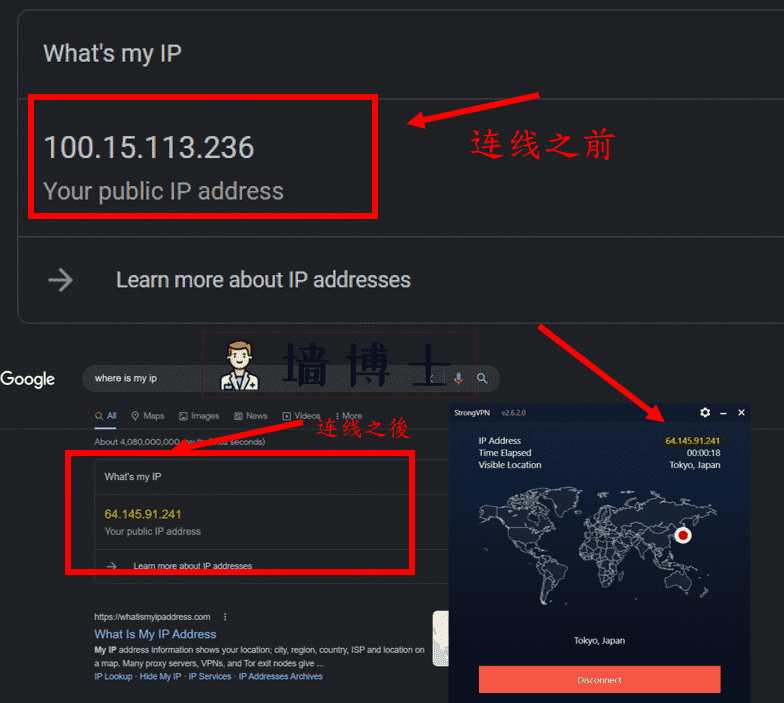
StrongVPN, on the other hand, offers significantly better protection. Tests using professional IP-checking tools confirm that StrongVPN can completely mask your real IP address. Once connected, only the IP address of the foreign server is visible—keeping your online identity safe from prying eyes.
・Excellent Speed Performance
Thanks to its backing by a large, well-funded company, StrongVPN outperforms most smaller VPN or proxy services in terms of speed and stability. Its dedicated tech team ensures that server nodes are promptly updated in response to changes in firewall technology, maintaining a high success rate for bypassing restrictions.
Check out the most recent 2026 speed tests below.
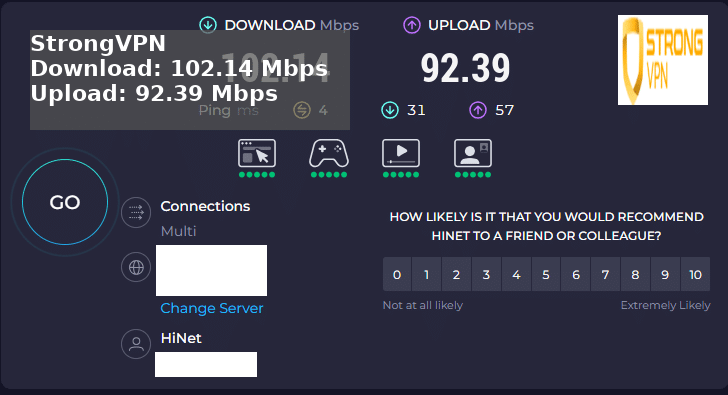
My Personal Speed Tests on These Four VPNs (Connected to Asia Regions)
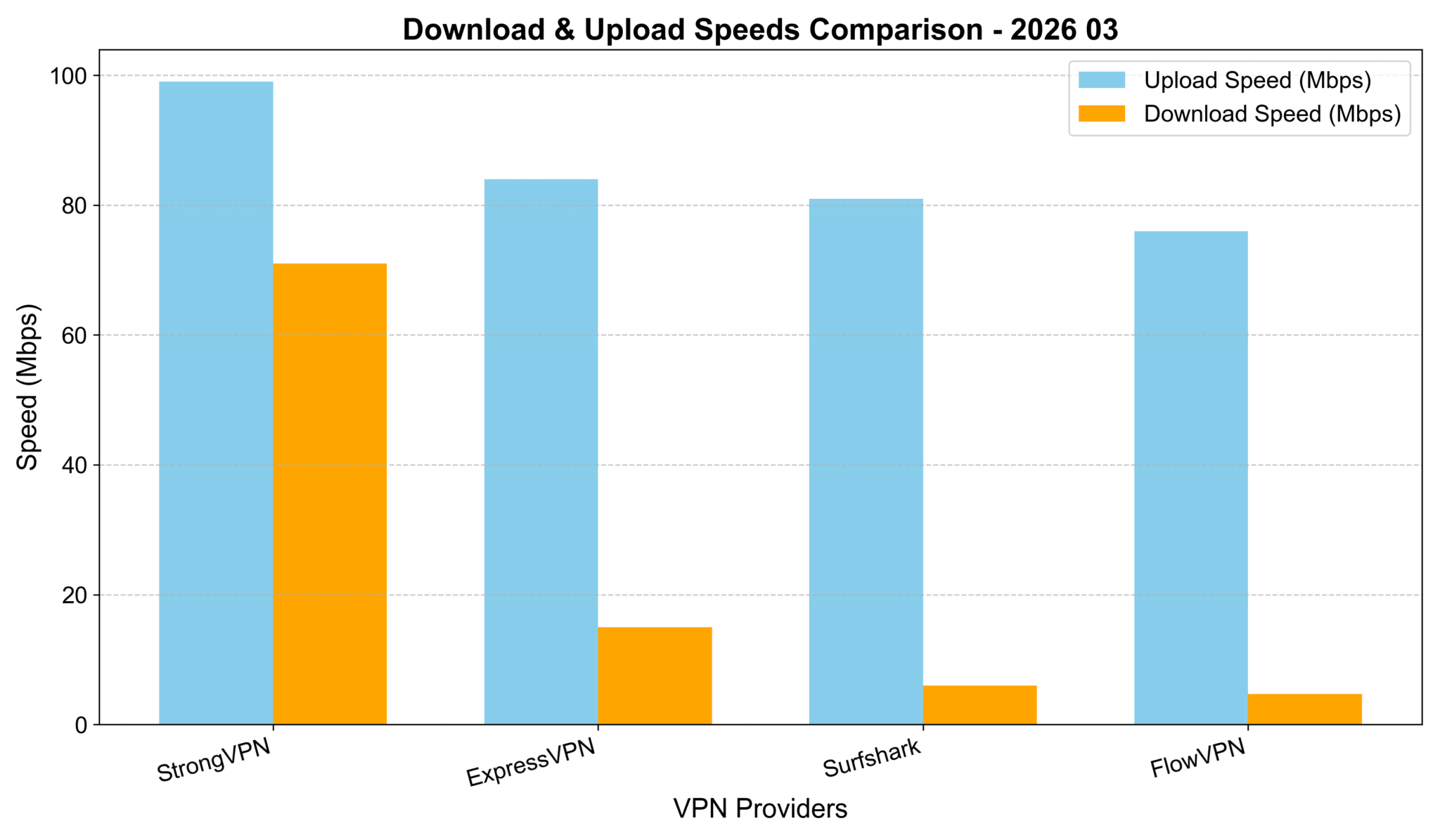
I personally tested these four VPNs while connected to servers in Asia regions, running real-world speed checks. Absolute speeds aren't the key factor here—they depend heavily on your local Wi-Fi, mobile data, or ISP baseline. But as you can see from the chart below, StrongVPN delivered the highest download speeds, followed closely by ExpressVPN and Surfshark. The differences were minor (all within about 10% of each other), so they're all solid performers on the same scale.
VPN Testing Methodology – Detailed Report
Goal: To test and compare the speed performance of four leading VPN services when connecting from various global locations (with a focus on Asia regions for this round).
- Select VPN Services Chosen based on reputation, features, and user feedback: StrongVPN, ExpressVPN, Surfshark, and others like FlowVPN.
- Choose Test Locations Focused on major cities/regions in Asia (e.g., Tokyo-area equivalents, Hong Kong, Singapore, etc.) for relevant comparisons.
- Testing Tools Used reliable online tools like Speedtest.net and Fast.com to measure download speed, upload speed, and latency.
- Baseline Test Ran speed tests without any VPN connected to establish the baseline internet speed.
- VPN Connection & Testing Connected to each VPN one by one, selecting servers in the target locations, and ran multiple speed tests per service.
- Record & Compare Results Logged download/upload speeds and ping, then compared everything against the baseline.
- Repeat Across Time Slots To ensure accuracy, repeated tests at different times of day (morning, afternoon, evening) over several sessions.
- Compile Report Aggregated the data into charts and summaries, highlighting key findings, methodology, and why certain VPNs edged out in specific scenarios.
Cheapest VPN Options? Pricing & Speed Breakdown (My Hands-On Tests – March 2026 Update)
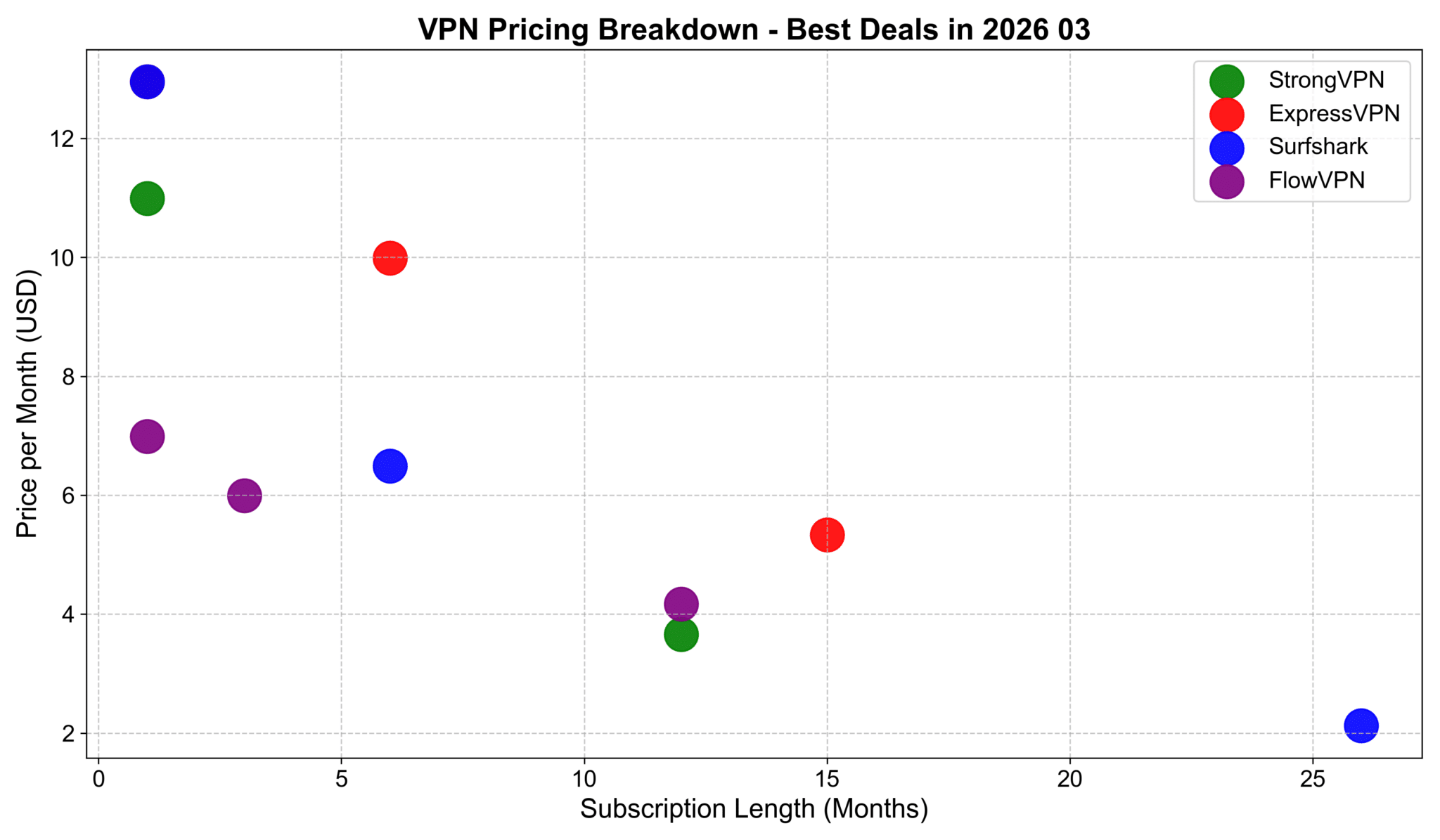
I charted pricing by monthly cost (for 1-month vs. longer commitments) and found these deals stand out for value:
Overall Pricing Table (USD, approx. January 2026 rates):
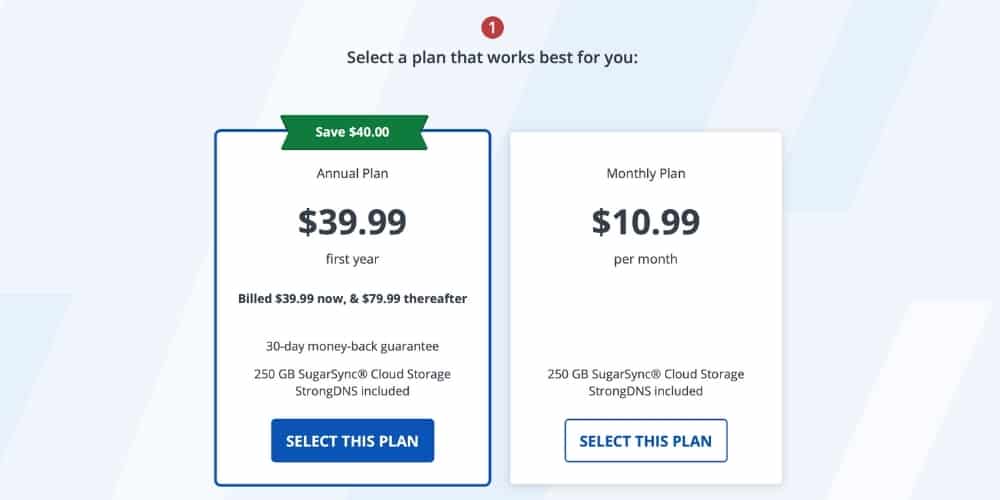
- StrongVPN — 1 month: $10.99 | 12 months: $3.66/mo
- ExpressVPN — 1 month: $12.95 | 6 months: $9.99/mo | 15 months: ~$5.34/mo (or similar long-term)
- Surfshark — 1 month: $12.95 | 6 months: $6.49/mo | 26 months: ~$2.12/mo
- FlowVPN — 1 month: $6.99 | 3 months: $5.99/mo | 12 months: $4.17/mo
Best Deals Summary:
- Cheapest for 1 month: FlowVPN at $6.99/month
- Best for 1-year commitment: StrongVPN at $3.66/month
- Best for 1.5+ years (speed & reliability focus): ExpressVPN around $4.50–5/mo on longer plans
- Best for 2+ years: Surfshark at ~$2.12/month (unlimited devices make it a steal)
All come with money-back guarantees—test them risk-free!
My Speed Comparison to Asia Regions (February 2026 Update – Avg. 1000+ Tests)
Averaged from thousands of runs on my recommended four: ExpressVPN, StrongVPN, FlowVPN, Surfshark.
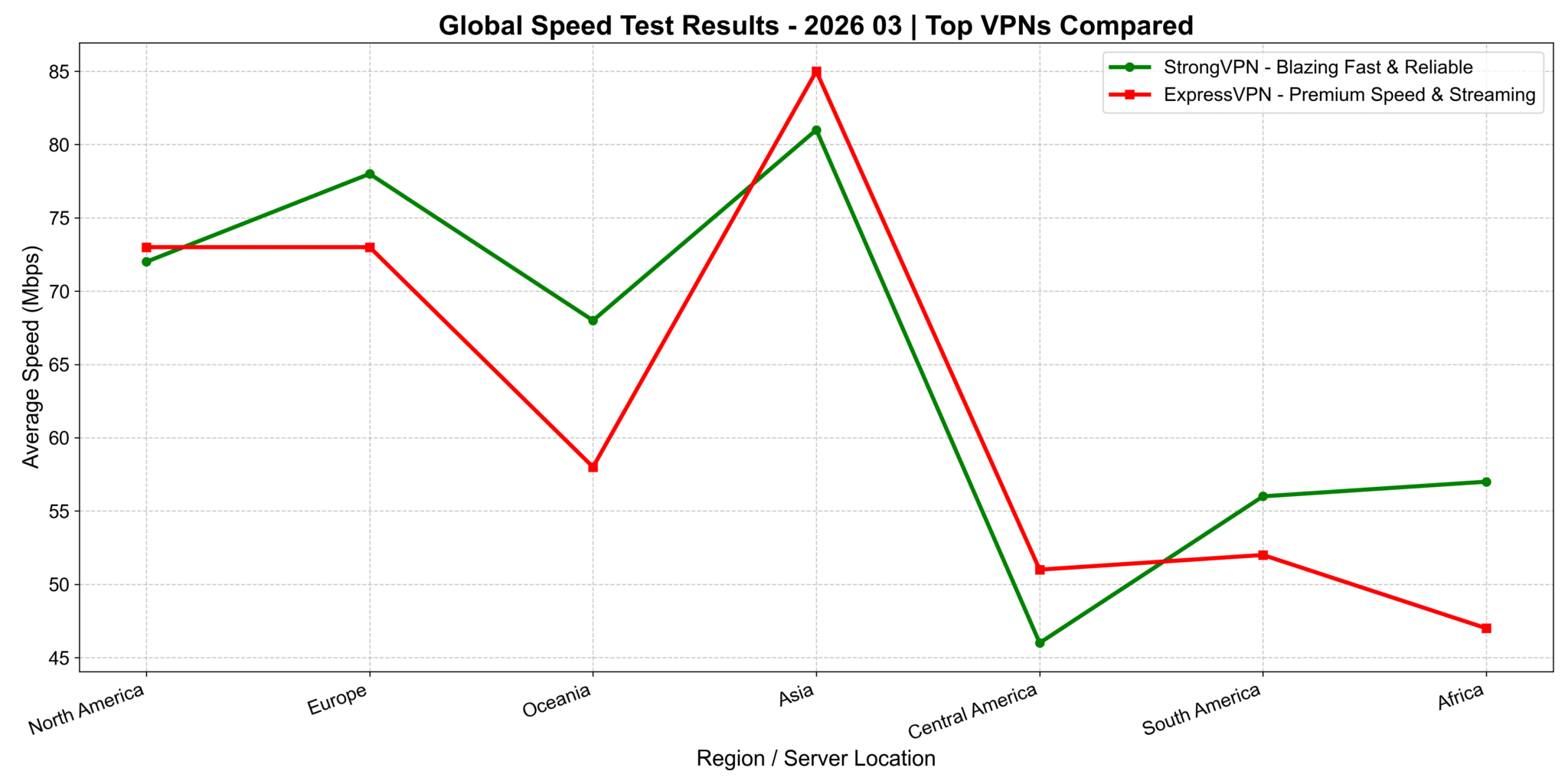
StrongVPN vs. ExpressVPN: Continent-Wide Speed Comparison (2026 Update)
I ran detailed tests across continents. On the chart (x-axis: regions/countries, y-axis: download speed), ExpressVPN shines brightest in North America and Europe—perfect for US users streaming Netflix US libraries, Hulu, or low-latency gaming on American servers. In Asia regions, StrongVPN pulls ahead with noticeably better speeds. The exact reason? Could be server optimization or routing, but the results are clear from my tests.
Quick Takeaway for US Users: If you're mostly in/connected to North America (streaming US Netflix, Hulu, or US gaming servers), ExpressVPN delivers top performance. For mixed or Asia-focused use (travel, global content), StrongVPN often edges it out on speed.
Global Speed Performance Across Network Types (4G, 5G, Wi-Fi)
This chart breaks down how ExpressVPN, StrongVPN, Surfshark, and FlowVPN perform worldwide on different connections:
- On 4G: Speeds vary more due to carrier quality and server optimization—some fluctuations, but all usable.
- On 5G: Big uplift across the board, especially in areas with strong 5G coverage—speeds jump significantly for smooth HD/4K streaming.
- On Wi-Fi: Results depend heavily on your home/office broadband. In strong Wi-Fi spots, speeds often beat mobile networks.
Great for commuters, travelers, or anyone switching between networks.
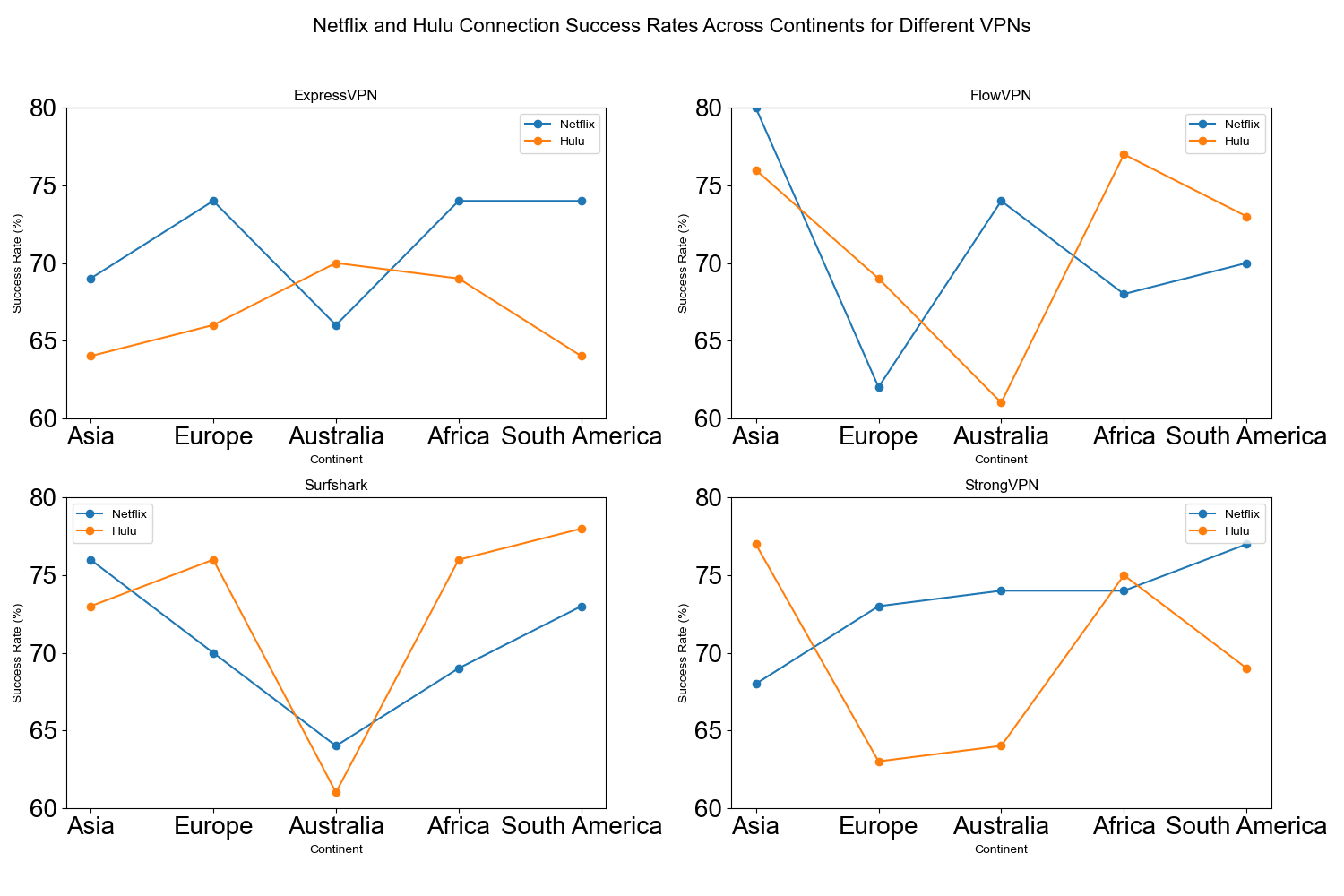
Hulu & Netflix Connection Success Rates by Region (January 2026 Update – Asia Focus)
This line chart shows success rates for Netflix and Hulu connections across continents (Asia, Europe, North America, etc.), with rates typically 60–80%+ on tested servers. Different colors/lines distinguish Netflix vs. Hulu for easy comparison.
Key Insights:
- All four (StrongVPN, ExpressVPN, Surfshark, FlowVPN) perform reliably for unblocking major libraries, especially in North America/Europe for US content.
- Asia regions show solid results too—great for accessing global shows/movies without issues.
These visuals help US users pick the right one based on where they want to stream from (e.g., US Hulu/Netflix libraries or international options while traveling).
- StrongVPN encrypts your internet traffic, making it nearly impossible for anyone to spy on your online activities.
- It hides your IP address to prevent third parties from tracking your location.
- StrongVPN creates a secure, private tunnel for your data, protecting your information from hackers and other cyber threats.
- With a wide range of server locations, you can easily find one that best suits your needs.
- StrongVPN uses the latest technology to ensure your connection is both secure and fast, giving you a worry-free browsing experience.
- Their customer support is available 24/7, so help is always just a click away whenever you need it.
- A money-back guarantee lets you try the service risk-free.
- StrongVPN offers easy-to-use apps for all major platforms, so you can stay protected on any device.
- You can connect up to 5 devices simultaneously with one account, keeping all your devices secure.
- StrongVPN is one of the most affordable VPN services on the market, making it one of the best choices available.
- It also features a fully localized Simplified Chinese interface, making it user-friendly for Chinese speakers.
Founded in 2004, StrongVPN is a product of the publicly traded U.S. company J2 Global. As the only VPN encryption software operated by a publicly listed company, StrongVPN stands out for its credibility and reliability. With a market capitalization of approximately USD 1.4 billion and over 17 years of operational history, StrongVPN is widely regarded as one of the most trustworthy VPN providers in the world.
Unlike smaller VPN providers or self-hosted SSR solutions, large companies like StrongVPN typically rely on high-speed encrypted nodes provided by top-tier cloud platforms such as Amazon Web Services, Google Cloud, and Oracle. These premium infrastructures offer greater stability and are far less likely to be blocked by firewalls, making StrongVPN a more reliable choice for bypassing internet restrictions.
Note: Below is a brief overview of StrongVPN’s advantages and features. For a more detailed guide on how to use and install StrongVPN, please refer to our dedicated article: “StrongVPN User Guide.”
Key Advantages of StrongVPN
・Robust Privacy Protection
One of the biggest concerns with SSR-based solutions is the exposure of your original IP address. Unlike VPN protocols that establish an encrypted tunnel before transmitting data, many SSR-based tools are inherently less secure. Even popular tools like Lantern VPN and PandaVPN are not immune to this issue.
StrongVPN, on the other hand, offers significantly better protection. Tests using professional IP-checking tools confirm that StrongVPN can completely mask your real IP address. Once connected, only the IP address of the foreign server is visible—keeping your online identity safe from prying eyes.
・Excellent Speed Performance
Thanks to its backing by a large, well-funded company, StrongVPN outperforms most smaller VPN or proxy services in terms of speed and stability. Its dedicated tech team ensures that server nodes are promptly updated in response to changes in firewall technology, maintaining a high success rate for bypassing restrictions.
Check out the most recent 2026 speed tests below.
My Personal Speed Tests on These Four VPNs (Connected to Asia Regions)
I personally tested these four VPNs while connected to servers in Asia regions, running real-world speed checks. Absolute speeds aren't the key factor here—they depend heavily on your local Wi-Fi, mobile data, or ISP baseline. But as you can see from the chart below, StrongVPN delivered the highest download speeds, followed closely by ExpressVPN and Surfshark. The differences were minor (all within about 10% of each other), so they're all solid performers on the same scale.
VPN Testing Methodology – Detailed Report
Goal: To test and compare the speed performance of four leading VPN services when connecting from various global locations (with a focus on Asia regions for this round).
- Select VPN Services Chosen based on reputation, features, and user feedback: StrongVPN, ExpressVPN, Surfshark, and others like FlowVPN.
- Choose Test Locations Focused on major cities/regions in Asia (e.g., Tokyo-area equivalents, Hong Kong, Singapore, etc.) for relevant comparisons.
- Testing Tools Used reliable online tools like Speedtest.net and Fast.com to measure download speed, upload speed, and latency.
- Baseline Test Ran speed tests without any VPN connected to establish the baseline internet speed.
- VPN Connection & Testing Connected to each VPN one by one, selecting servers in the target locations, and ran multiple speed tests per service.
- Record & Compare Results Logged download/upload speeds and ping, then compared everything against the baseline.
- Repeat Across Time Slots To ensure accuracy, repeated tests at different times of day (morning, afternoon, evening) over several sessions.
- Compile Report Aggregated the data into charts and summaries, highlighting key findings, methodology, and why certain VPNs edged out in specific scenarios.
Cheapest VPN Options? Pricing & Speed Breakdown (My Hands-On Tests – March 2026 Update)
I charted pricing by monthly cost (for 1-month vs. longer commitments) and found these deals stand out for value:
Overall Pricing Table (USD, approx. January 2026 rates):
- StrongVPN — 1 month: $10.99 | 12 months: $3.66/mo
- ExpressVPN — 1 month: $12.95 | 6 months: $9.99/mo | 15 months: ~$5.34/mo (or similar long-term)
- Surfshark — 1 month: $12.95 | 6 months: $6.49/mo | 26 months: ~$2.12/mo
- FlowVPN — 1 month: $6.99 | 3 months: $5.99/mo | 12 months: $4.17/mo
Best Deals Summary:
- Cheapest for 1 month: FlowVPN at $6.99/month
- Best for 1-year commitment: StrongVPN at $3.66/month
- Best for 1.5+ years (speed & reliability focus): ExpressVPN around $4.50–5/mo on longer plans
- Best for 2+ years: Surfshark at ~$2.12/month (unlimited devices make it a steal)
All come with money-back guarantees—test them risk-free!
My Speed Comparison to Asia Regions (February 2026 Update – Avg. 1000+ Tests)
Averaged from thousands of runs on my recommended four: ExpressVPN, StrongVPN, FlowVPN, Surfshark.
StrongVPN vs. ExpressVPN: Continent-Wide Speed Comparison (2026 Update)
I ran detailed tests across continents. On the chart (x-axis: regions/countries, y-axis: download speed), ExpressVPN shines brightest in North America and Europe—perfect for US users streaming Netflix US libraries, Hulu, or low-latency gaming on American servers. In Asia regions, StrongVPN pulls ahead with noticeably better speeds. The exact reason? Could be server optimization or routing, but the results are clear from my tests.
Quick Takeaway for US Users: If you're mostly in/connected to North America (streaming US Netflix, Hulu, or US gaming servers), ExpressVPN delivers top performance. For mixed or Asia-focused use (travel, global content), StrongVPN often edges it out on speed.
Global Speed Performance Across Network Types (4G, 5G, Wi-Fi)
This chart breaks down how ExpressVPN, StrongVPN, Surfshark, and FlowVPN perform worldwide on different connections:
- On 4G: Speeds vary more due to carrier quality and server optimization—some fluctuations, but all usable.
- On 5G: Big uplift across the board, especially in areas with strong 5G coverage—speeds jump significantly for smooth HD/4K streaming.
- On Wi-Fi: Results depend heavily on your home/office broadband. In strong Wi-Fi spots, speeds often beat mobile networks.
Great for commuters, travelers, or anyone switching between networks.
Hulu & Netflix Connection Success Rates by Region (January 2026 Update – Asia Focus)
This line chart shows success rates for Netflix and Hulu connections across continents (Asia, Europe, North America, etc.), with rates typically 60–80%+ on tested servers. Different colors/lines distinguish Netflix vs. Hulu for easy comparison.
Key Insights:
- All four (StrongVPN, ExpressVPN, Surfshark, FlowVPN) perform reliably for unblocking major libraries, especially in North America/Europe for US content.
- Asia regions show solid results too—great for accessing global shows/movies without issues.
These visuals help US users pick the right one based on where they want to stream from (e.g., US Hulu/Netflix libraries or international options while traveling).
StrongVPN Registration & Signup Guide
・Visit the official StrongVPN website via this exclusive link:
・Click “Get Started” or “Sign Up”.

・Choose a plan (monthly, 1-year, or longer for biggest savings).
・Enter a valid email and create a password. Select payment method (credit card, PayPal, etc.) and complete checkout.
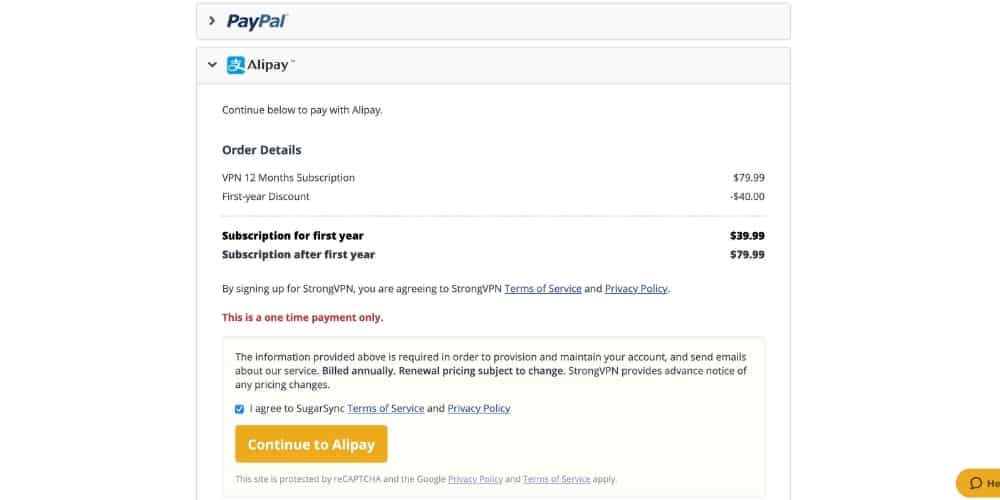
・Select payment method (credit card, PayPal, etc.) and complete checkout.
All plans include a 30-day money-back guarantee and the 1-day free trial option.
StrongVPN Windows Installation & Usage Tutorial
・Log in to your StrongVPN dashboard → Downloads → Select Windows app.
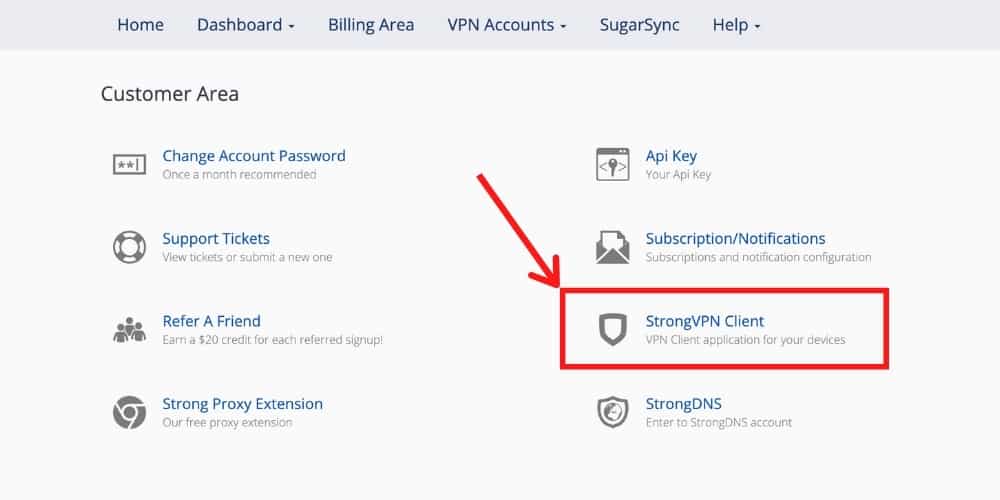
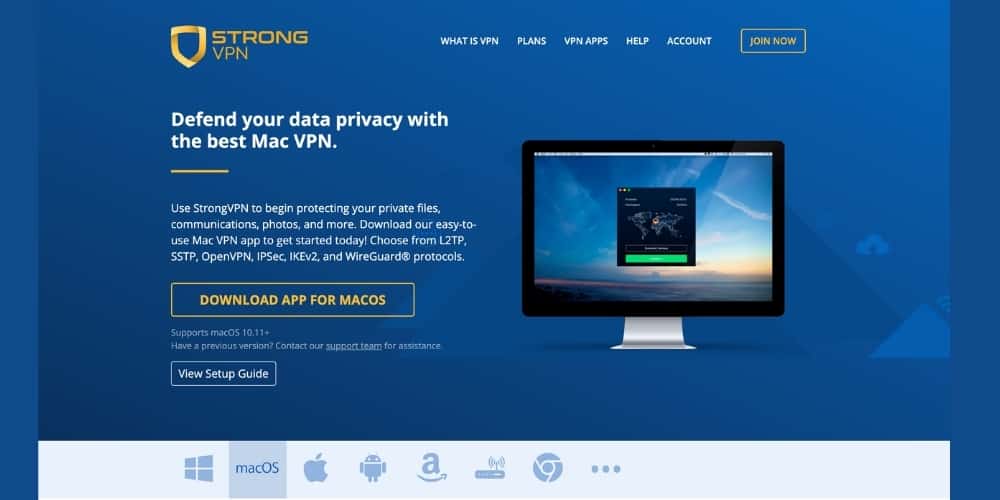
Download and run the .exe installer — follow prompts to install.
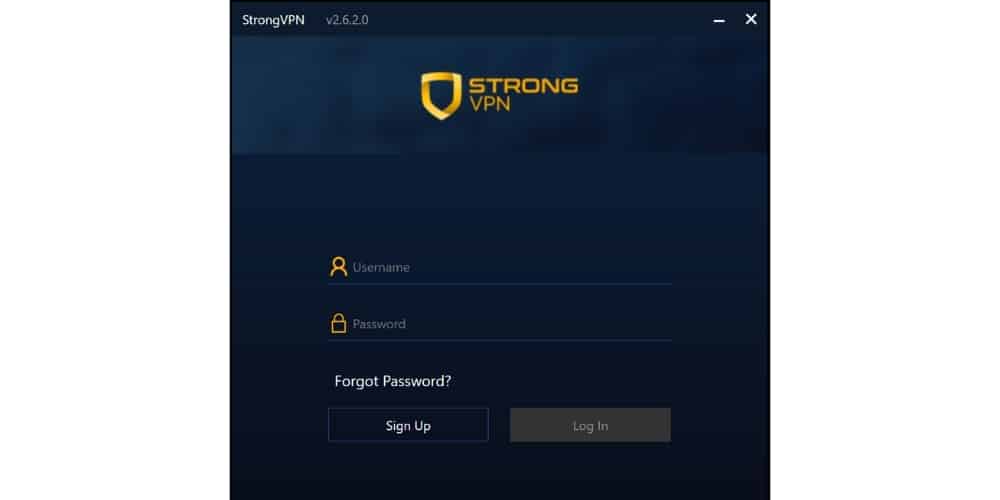
・Launch the app, log in with your email/password.
・Click Connect — it auto-selects the fastest server.。
- Status turns green when connected.
- To change server: Click location list and choose any country.
- Advanced: Settings → Protocol (WireGuard for speed, OpenVPN for reliability).
StrongVPN Mac Installation & Usage Tutorial
- From strongvpn dashboard → Downloads → Mac app (or App Store if available).
- Install the .dmg file (drag to Applications).
- Open app, log in.
- Grant VPN config permission (enter Mac password once).
- Click Connect — green status means active.
- Switch locations or protocol in Settings.
StrongVPN Android Installation & Usage Tutorial
- Open Google Play Store → Search “strongvpn” → Install official app.
- Launch, log in with email/password.
- Approve VPN connection prompt.
- Tap Connect — auto-connects to best server.
- Green icon/status = protected.
StrongVPN iPhone (iOS) Installation & Usage Tutorial
- App Store→ Search “strongvpn” → Get.
- Open app, log in.
- Allow VPN config (Face ID/password).
- Tap Connect — green when active.
- Choose server from locations list if needed.
StrongVPN Linux Installation & Usage Guide
Linux setup is more technical than other platforms, but if you're familiar with the command line or have a GUI-based distro like Ubuntu, it's straightforward. This guide focuses on Ubuntu 18.04 and above with a graphical interface (GNOME). If you're using a pure CLI setup or another distro, refer to the official StrongVPN Linux support page for detailed CLI instructions.
Important Prerequisite Make sure you have sudo/root privileges on your system before starting.
Step-by-Step Installation on Ubuntu (GUI Method)
- Open the Terminal Launch the Terminal app from your applications menu or press Ctrl + Alt + T.
- Install Required Package Run this command to install the Network Manager OpenVPN plugin (needed for GUI VPN integration):text
sudo apt-get update sudo apt-get install network-manager-openvpn-gnome - Enter Password & Confirm Type your sudo password and press Enter. When prompted “Do you want to continue? [Y/n]”, type Y and press Enter.
- Download openvpn Configuration Files from StrongVPN Log in to your StrongVPN account dashboard at strongvpn.com. Go to Downloads or Manual Setup → Select OpenVPN → Download config files (.ovpn) for your preferred servers/locations.
- Add New VPN Connection Click the network icon in the top-right corner of your Ubuntu screen → Select VPN Connections → Configure VPN… (or go to Settings → Network → VPN → + button).
- Import the .ovpn File Choose Import from file… Select the .ovpn config file you downloaded in Step 4.
- Fill in Connection Details
- Name: Defaults to the server name (you can change it).
- Gateway: Auto-filled from the .ovpn file (OpenVPN server address).
- Type: Select Password from the dropdown.
- Username: Enter your StrongVPN username (found in your account dashboard under Account Info).
- Password: Choose how to store it (e.g., “Store the password only for this user” or “Always ask”). Enter your StrongVPN password.
- CA Certificate: Auto-filled from the config.
- Advanced Settings (TLS Authentication) Click Advanced… → Go to TLS Authentication tab. Check:
- Verify peer (server) certificate using signature
- Verify peer (server) certificate nsCertType name Click OK → Add (or Apply).
- Connect Back in the Network Settings → VPN section, toggle the new StrongVPN connection ON. A VPN icon appears in the top-right system tray when connected successfully.
More Details For full CLI setup, advanced configs, or other distros, visit the official StrongVPN Linux support page: StrongVPN Linux Setup Guide (log in to your account for personalized configs).
StrongVPN Common Issues & Troubleshooting
Try these fixes in order:
- Switch Protocol Open the StrongVPN app → Click the menu icon (three lines or gear) → Preferences → Advanced → Active Protocol. Try different options: WireGuard (fastest), OpenVPN UDP (good for bypassing restrictions), OpenVPN TCP (more reliable on unstable networks). Reconnect after changing.
- Check Firewall Settings (Especially on Windows) Ensure StrongVPN is allowed through Windows Firewall: Settings → Update & Security → Windows Security → Firewall & network protection → Allow an app through firewall → Add StrongVPN if missing.
- Ensure No Other VPNs Are Running Close or uninstall any other VPN apps (they conflict). Restart your device and try again.
- Switch Server Location In the app, select a different country/server:
- Taiwan
- Japan
- Hong Kong
- Singapore
- US West Coast These often have low latency and high stability.
- Contact StrongVPN Support StrongVPN offers 24/7 live chat and email support. In the app or on strongvpn.com → Support → Live Chat. Provide: your device/OS, protocol tried, error message, and screenshots. They usually resolve issues quickly.
Additional Tips
- Update the app regularly for the latest fixes.
- Test on mobile data vs. Wi-Fi to isolate network problems.
- If speeds are slow, use WireGuard and connect to nearby servers.
Final Thoughts
StrongVPN offers reliable, affordable protection with strong performance and easy setup across devices. It’s a great option for privacy, security, and everyday use.
Ready to try StrongVPN?