
Last Updated on 2026-08-21 by Dr.Wall
Android VPN testing begins after the phone leaves Wi-Fi
Android vendors manage background apps differently, so a VPN that works on one phone can be killed aggressively on another. I check Always-on VPN, the block-without-VPN option, battery optimisation and reconnection after moving from Wi-Fi to 5G. I also verify that banking and work-profile apps still behave normally before enabling split tunnelling.
My order is StrongVPN, ExpressVPN, Surfshark, then FlowVPN. Download APK files only from the provider's own site when Play Store access is unavailable, and verify the domain before installing.
A useful Android VPN test begins when the phone changes state: Wi-Fi to 5G, screen on to sleep, personal profile to work profile, and normal browsing to a banking app. A service that wins one download test but fails to reconnect quietly is not the best Android VPN for that phone.
A reliable VPN for Android should reconnect after network changes, provide a clear kill switch or Android always-on option, and coexist with the apps you cannot afford to break. On public Wi-Fi, first finish the venue login page, then connect the VPN and confirm that email, calls and cloud files still work.
When Play Store access is unavailable, an official APK can be a fallback, but the source matters more than the filename. Use the provider's own site, verify the domain, and remove the browser's permission to install unknown apps when setup is complete.
These are the checks I use before keeping an Android VPN:
- Why free Android VPNs are usually a bad idea
- How to download and install VPN apps on Android (even if restricted in your region)
- Top recommended Android VPNs for privacy, speed, and streaming
- VPN speed & value comparison (with top picks)
- Common Android VPNs to avoid
- Downsides of self-hosted VPN setups on Android
- Final recommendation
Best paid VPN for Android: the test that separates reliable apps
| Option | Why I would test it | Pass condition |
|---|---|---|
| StrongVPN | Lower-cost paid starting point | Reconnects after Wi-Fi, 5G and sleep |
| ExpressVPN | Premium travel and faster recovery | Simple recovery on hotel and airport networks |
| Surfshark | Many phones, tablets and family devices | Stable app behaviour across the household |
| FlowVPN | Short compatibility test | The trial survives the exact network and apps needed |
Android's Always-on VPN and “Block connections without VPN” settings are useful only after the app has passed reconnection tests. On captive-portal Wi-Fi, you may need to complete the venue login before enabling strict blocking. Check banking and work-profile apps separately; split tunnelling is a compatibility tool, not a reason to bypass employer policy.
Why Free Android VPNs (VPN Free Android) Are Rarely Worth It
Many people search for “free VPN Android” and find apps promising unlimited access with no cost. But think about it: running a VPN requires expensive overseas servers, bandwidth, and constant updates to stay secure and fast. If it's truly free with no ads or upsell, how do they pay for it?
In reality, most free VPNs fall into two categories:
- The “good” ones offer short trials (like 1-7 days) before requiring payment—fair enough.
- The risky ones let you use them endlessly but secretly harvest data: emails, passwords, browsing history, or even install trackers/malware. Recent independent privacy reports show many free VPN apps on Android request excessive permissions, leak data, use outdated code vulnerable to hacks, or sell user info to advertisers.
Even if one works temporarily, free providers often can't keep up with security updates or server maintenance, leading to slowdowns, disconnections, or blocked access over time. For real privacy and reliability, stick to reputable paid options with audited no-logs policies, strong encryption, and money-back guarantees.
Pro tip: Some premium VPNs offer limited free tiers (like Proton VPN's unlimited data on a few servers) or generous trials—better than shady “completely free” apps.
How to Download Android VPN Apps (APK) Safely
Most top VPNs have official apps on the Google Play Store, but in some regions, availability can be limited due to store policies. No worries—leading providers make it easy:
Popular options like ExpressVPN, Surfshark, NordVPN, and others provide direct APK downloads via their official websites. Here's the quick process:
- Visit the VPN's official site from your Android browser (e.g., Chrome).
- Look for the “Download” or “Get the App” section—many have a dedicated Android page with a direct APK link.
- Enable “Install unknown apps” in Settings > Apps > Special app access (for your browser).
- Download and install the APK—it's signed and safe from the provider.
- Launch the app, sign up/log in, and connect.
This bypasses any store restrictions and gets you the latest version fast. Always download from the official site to avoid fakes.
Best Android VPN Recommendations for Mobile Users
Here are some top-performing Android VPNs that excel in real-world use. What makes a great VPN app for Android? In my experience, the following key features stand out:
- Stable reconnection and battery use you can measure on your phone
- Strong security (AES-256 encryption, kill switch, no-logs policy)
- Intuitive, user-friendly Android app with quick connect
- Wide server network for low-latency connections worldwide
- Reliable streaming and content access (Netflix, YouTube, etc.)
- Unlimited or multi-device support
- Solid customer support and regular updates
Android: app safety, battery and public Wi-Fi
Android VPN use is mobile-first. I check Play Store or official APK provenance, battery use, auto-connect on public Wi-Fi, split tunnelling and whether the tunnel recovers after the phone sleeps.
- kill switch and auto-connect
- battery drain after one day
- split tunneling for banking or local apps
- avoid unknown free APKs
- StrongVPN for a paid budget route
- ExpressVPN for the easiest recovery while travelling
- Surfshark for many Android devices
- FlowVPN for a short compatibility test
Best Android VPN Recommendation #1: StrongVPN – Best Value & Most Affordable Premium Option
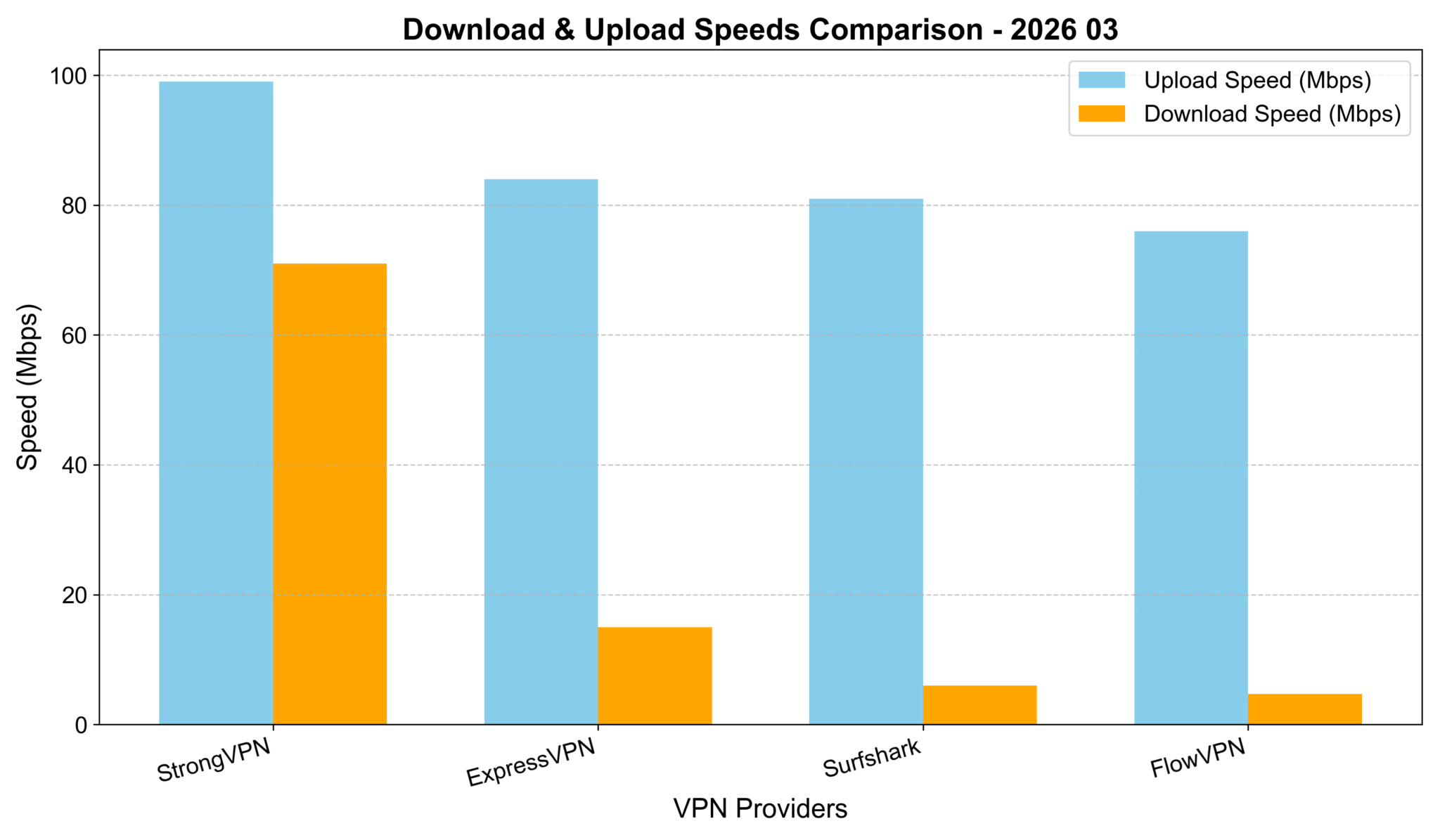
My Speed Tests on These Four VPNs
I tested these four VPNs in real-world browsing and streaming conditions, with routes that are relevant for Asia-Pacific users. Absolute speeds aren't the key factor here—they depend heavily on your local Wi-Fi, mobile data, or ISP baseline. But as you can see from the chart below, StrongVPN delivered the highest download speeds, followed closely by ExpressVPN and Surfshark. The differences were minor (all within about 10% of each other), so they're all solid performers on the same scale.
VPN Testing Methodology – Detailed Report
How to read this test: the numbers are a practical snapshot, not a universal promise. Your own speed will depend on your ISP, Wi-Fi quality, device and chosen server.
- Select VPN Services Chosen based on reputation, features, and user feedback: StrongVPN, ExpressVPN, Surfshark, and others like FlowVPN.
- Choose Test Locations Focused on major cities/regions in Asia (e.g., Tokyo-area equivalents, Hong Kong, Singapore, etc.) for relevant comparisons.
- Testing Tools Used reliable online tools like Speedtest.net and Fast.com to measure download speed, upload speed, and latency.
- Baseline Test Ran speed tests without any VPN connected to establish the baseline internet speed.
- VPN Connection & Testing Connected to each VPN one by one, selecting servers in the target locations, and ran multiple speed tests per service.
- Record & Compare Results Logged download/upload speeds and ping, then compared everything against the baseline.
- Repeat Across Time Slots To ensure accuracy, repeated tests at different times of day (morning, afternoon, evening) over several sessions.
- Compile Report Aggregated the data into charts and summaries, highlighting key findings, methodology, and why certain VPNs edged out in specific scenarios.
Cheapest VPN Options? Pricing & Speed Breakdown (My Hands-On Tests – March 2026 Update)
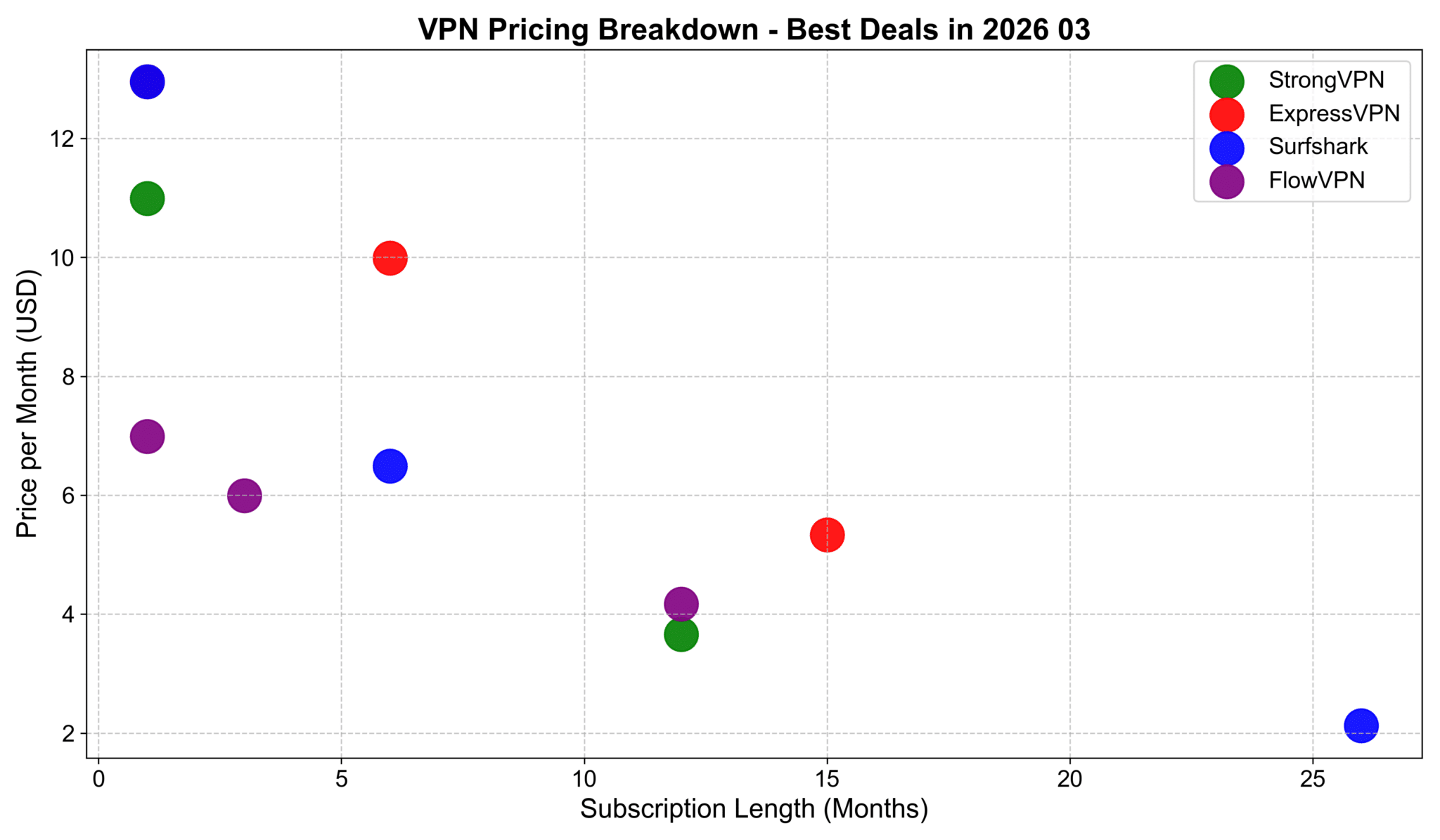
I charted pricing by monthly cost (for 1-month vs. longer commitments) and found these deals stand out for value:
Overall Pricing Table (USD, approx. January 2026 rates):
- StrongVPN — 1 month: $10.99 | 12 months: $3.66/mo
- ExpressVPN — 1 month: $12.95 | 6 months: $9.99/mo | 15 months: ~$5.34/mo (or similar long-term)
- Surfshark — 1 month: $12.95 | 6 months: $6.49/mo | 26 months: ~$2.12/mo
- FlowVPN — 1 month: $6.99 | 3 months: $5.99/mo | 12 months: $4.17/mo
Best Deals Summary:
- Cheapest for 1 month: FlowVPN at $6.99/month
- Best for 1-year commitment: StrongVPN at $3.66/month
- Best for 1.5+ years (speed & reliability focus): ExpressVPN around $4.50–5/mo on longer plans
- Best for 2+ years: Surfshark at ~$2.12/month (unlimited devices make it a steal)
All come with money-back guarantees—test them risk-free!
My Speed Comparison to Asia Regions (February 2026 Update – Avg. 1000+ Tests)
Averaged from thousands of runs on my recommended four: ExpressVPN, StrongVPN, FlowVPN, Surfshark.
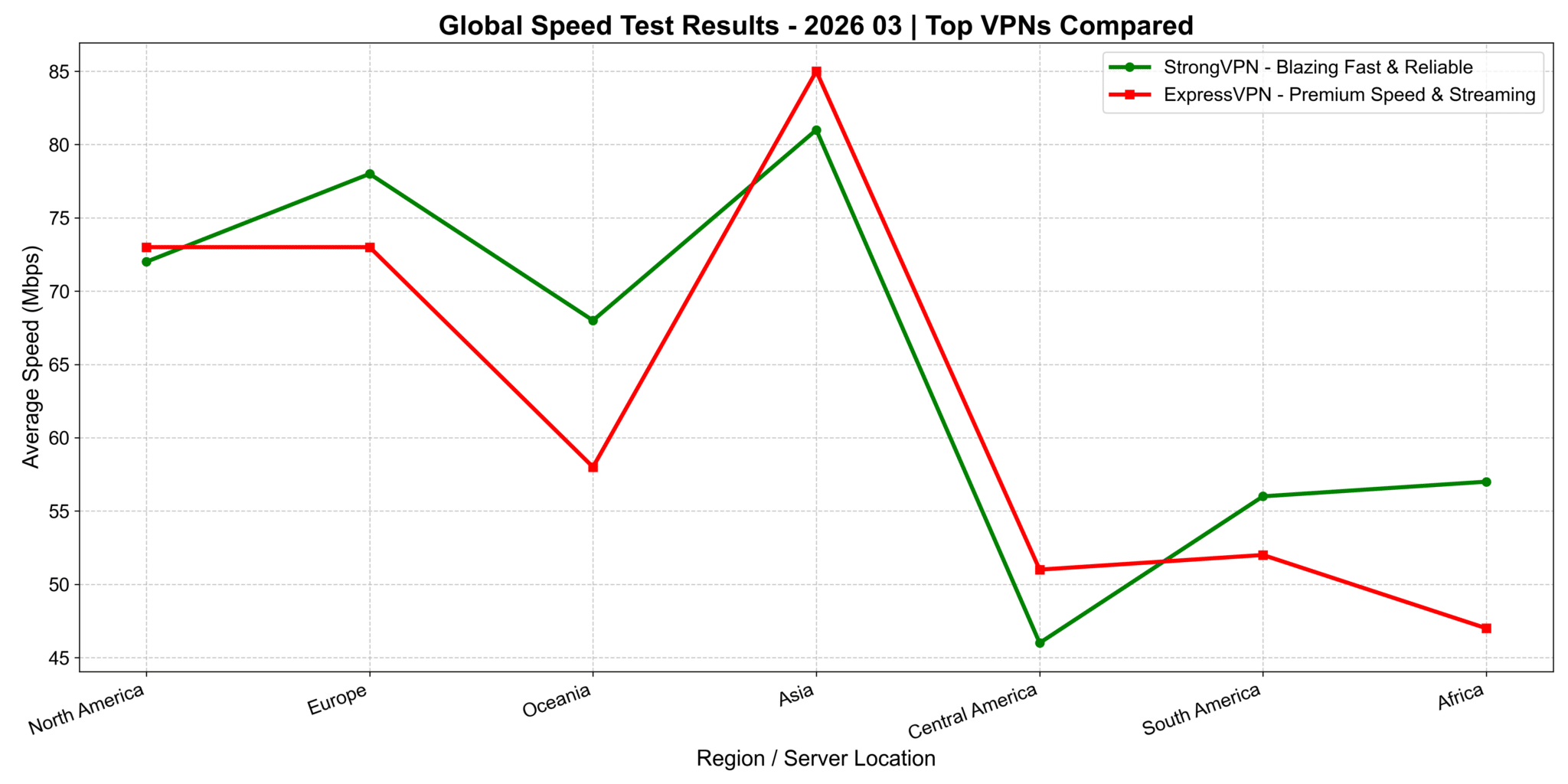
StrongVPN vs. ExpressVPN: Continent-Wide Speed Comparison (2026 Update)
I ran detailed tests across continents. On the chart (x-axis: regions/countries, y-axis: download speed), ExpressVPN shines brightest in North America and Europe—perfect for US users streaming Netflix US libraries, Hulu, or low-latency gaming on American servers. In Asia regions, StrongVPN pulls ahead with noticeably better speeds. The exact reason? Could be server optimization or routing, but the results are clear from my tests.
Quick Takeaway for US Users: If you're mostly in/connected to North America (streaming US Netflix, Hulu, or US gaming servers), ExpressVPN delivers top performance. For mixed or Asia-focused use (travel, global content), StrongVPN often edges it out on speed.
Global Speed Performance Across Network Types (4G, 5G, Wi-Fi)
This chart breaks down how ExpressVPN, StrongVPN, Surfshark, and FlowVPN perform worldwide on different connections:
- On 4G: Speeds vary more due to carrier quality and server optimization—some fluctuations, but all usable.
- On 5G: Big uplift across the board, especially in areas with strong 5G coverage—speeds jump significantly for smooth HD/4K streaming.
- On Wi-Fi: Results depend heavily on your home/office broadband. In strong Wi-Fi spots, speeds often beat mobile networks.
Great for commuters, travelers, or anyone switching between networks.
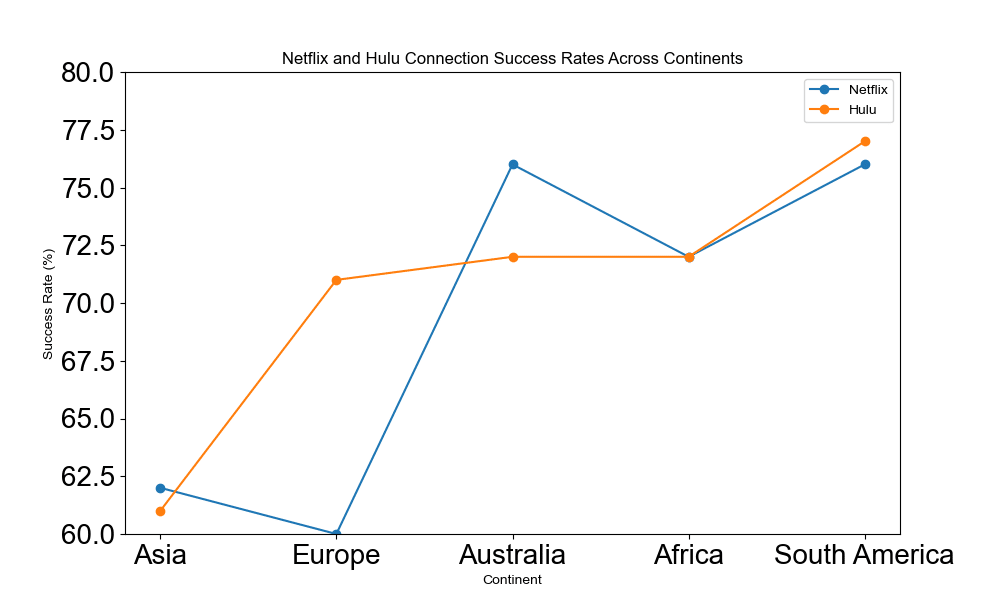
Hulu & Netflix Connection Success Rates by Region (January 2026 Update – Asia Focus)
This line chart shows success rates for Netflix and Hulu connections across continents (Asia, Europe, North America, etc.), with rates typically 60–80%+ on tested servers. Different colors/lines distinguish Netflix vs. Hulu for easy comparison.
Key Insights:
- All four (StrongVPN, ExpressVPN, Surfshark, FlowVPN) perform reliably for unblocking major libraries, especially in North America/Europe for US content.
- Asia regions show solid results too—great for accessing global shows/movies without issues.
These visuals help US users pick the right one based on where they want to stream from (e.g., US Hulu/Netflix libraries or international options while traveling).
#1 StrongVPN – straightforward paid starting point for Android
- StrongVPN encrypts your internet traffic, making it nearly impossible for anyone to spy on your online activities.
- It hides your IP address to prevent third parties from tracking your location.
- StrongVPN creates a secure, private tunnel for your data, protecting your information from hackers and other cyber threats.
- With a wide range of server locations, you can easily find one that best suits your needs.
- StrongVPN uses the latest technology to ensure your connection is both secure and fast, giving you a worry-free browsing experience.
- Their customer support is available 24/7, so help is always just a click away whenever you need it.
- A money-back guarantee lets you try the service risk-free.
- StrongVPN offers easy-to-use apps for all major platforms, so you can stay protected on any device.
- You can connect up to 5 devices simultaneously with one account, keeping all your devices secure.
- StrongVPN is one of the most affordable VPN services on the market, making it one of the best choices available.
- It also features a fully localized multilingual interface, making it user-friendly for multilingual users.
Founded in 2004, StrongVPN is a product of the publicly traded U.S. company J2 Global. As the only VPN encryption software operated by a publicly listed company, StrongVPN stands out for its credibility and reliability. With a market capitalization of approximately USD 1.4 billion and over 17 years of operational history, StrongVPN is widely regarded as one of the most trustworthy VPN providers in the world.
Unlike smaller VPN providers or self-hosted SSR solutions, large companies like StrongVPN typically rely on high-speed encrypted nodes provided by top-tier cloud platforms such as Amazon Web Services, Google Cloud, and Oracle. These premium infrastructures offer greater stability and are far less likely to be blocked by firewalls, making StrongVPN a more reliable choice for bypassing internet restrictions.
Note: Below is a brief overview of StrongVPN’s advantages and features. For a more detailed guide on how to use and install StrongVPN, please refer to our dedicated article: “StrongVPN User Guide.”
Key Advantages of StrongVPN
・Robust Privacy Protection
One of the biggest concerns with SSR-based solutions is the exposure of your original IP address. Unlike VPN protocols that establish an encrypted tunnel before transmitting data, many SSR-based tools are inherently less secure. Even popular tools like Lantern VPN and PandaVPN are not immune to this issue.
StrongVPN, on the other hand, offers significantly better protection. Tests using professional IP-checking tools confirm that StrongVPN can completely mask your real IP address. Once connected, only the IP address of the foreign server is visible—keeping your online identity safe from prying eyes.
・Excellent Speed Performance
Thanks to its backing by a large, well-funded company, StrongVPN outperforms most smaller VPN or proxy services in terms of speed and stability. Its dedicated tech team ensures that server nodes are promptly updated in response to changes in firewall technology, maintaining a high success rate for bypassing restrictions.
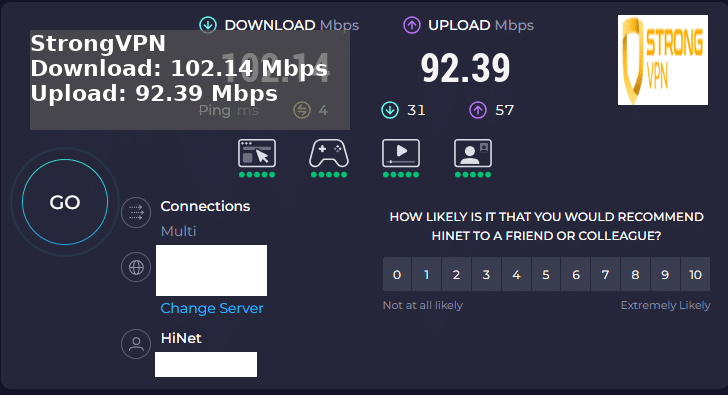
Check out the most recent 2026 speed tests below.
#2 ExpressVPN – premium option for travel and fast recovery
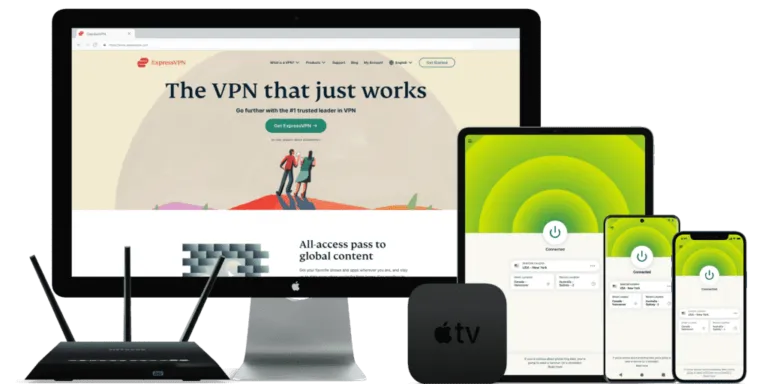
Extra months on selected plans · Automatic protocol switching · 30-day money-back guarantee
ExpressVPN: A World-Renowned VPN Provider Offering Top-Tier Security and Performance
Company Background
Founded in 2009, ExpressVPN is headquartered in the British Virgin Islands. While details about its ownership remain private, the company has consistently maintained a transparent approach in its operations, with a strong focus on privacy and security.
Key Features
ExpressVPN supports multiple VPN protocols including OpenVPN (UDP/TCP), IKEv2, L2TP/IPSec, and their own proprietary Lightway protocol. It uses AES-256 encryption—the industry standard for military-grade security. ExpressVPN also enforces a strict no-logs policy, meaning it does not collect or store any user activity data.
Servers and Locations
With an extensive network of servers in over 90 countries, ExpressVPN offers fast, stable, and reliable connections for users around the globe. Its broad coverage allows users to bypass geo-restrictions and access global content with ease.
Device Compatibility
ExpressVPN is compatible with a wide range of devices and platforms, including Windows, macOS, iOS, Android, Linux, routers, and smart TVs. One account can be used on up to 5 devices simultaneously.
Customer Support
ExpressVPN provides 24/7 customer support through live chat and email. Their official website also features a comprehensive library of tutorials and troubleshooting guides to help users resolve any issues efficiently.
Privacy and Security Features
ExpressVPN includes several advanced privacy tools, such as a kill switch (called “Network Lock”), split tunneling (which allows users to choose which apps use the VPN), and DNS leak protection—all designed to keep your data safe at all times.
Transparency and Audits
To back up its no-logs policy and ensure compliance with the highest security standards, ExpressVPN regularly publishes transparency reports and undergoes independent third-party audits.
- ExpressVPN is one of the most popular VPN services on the market, trusted by over 10 million users worldwide.
- It offers top-tier security with 256-bit encryption and a strict no-logs policy to ensure your privacy is always protected.
- ExpressVPN is compatible with a wide range of devices, including Windows, macOS, iOS, Android, and Linux.
- With over 3,000 servers in 94 countries, ExpressVPN provides extensive global coverage for fast and reliable connections.
- It offers unlimited bandwidth and server switching, making it perfect for streaming, gaming, and other high-demand activities.
- Customer support is available 24/7 through live chat and email, ensuring help is always just a click away.
- ExpressVPN comes with a 30-day money-back guarantee, so you can try it risk-free.
- It is often used by travelers and remote workers who need a polished app, strong device support and reliable privacy features.
- In our use, ExpressVPN is usually strongest when reliability, app quality and quick server switching matter more than chasing the cheapest plan.
- Overall, ExpressVPN is a top-tier, all-around VPN solution that combines excellent features with outstanding performance.
ExpressVPN offers a 30-day money-back guarantee and is a well-established VPN provider popular among users in the US, Europe, and other Western markets. With a massive and reliable user base, there's basically no worry about it disappearing or running off. It has servers in 105 countries worldwide, with over 3,000 servers in total.
Note: Below is a practical overview of ExpressVPN's key advantages and features. For a detailed breakdown of its functions, setup guide, and more, check out the “ExpressVPN Usage Guide” article.
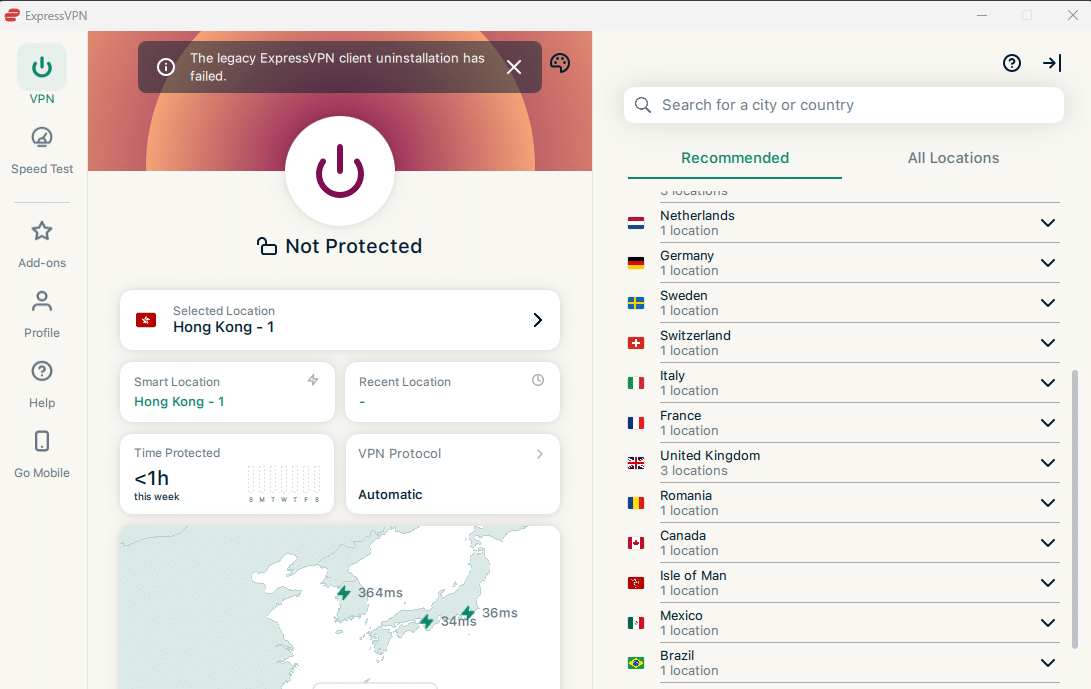
ExpressVPN offers dedicated servers optimized specifically for users on restrictive networks, eliminating the hassle of manually testing different nodes. These special configurations are designed to provide fast and stable access for handling restrictive networks. If you're looking for a simple, one-click solution to access the open internet, ExpressVPN is an excellent choice.
Dedicated R&D Team for the international Market
ExpressVPN is one of the better-known international VPN providers with long-running support for restrictive network environments. This matters because restrictive networks change often, and a VPN without ongoing maintenance can stop working quickly.
One-Click Speed Test
With ExpressVPN’s built-in Speed Test feature, users can instantly check the performance of all available servers. This makes it easy to choose the best server based on speed and latency, without the need for manual testing.
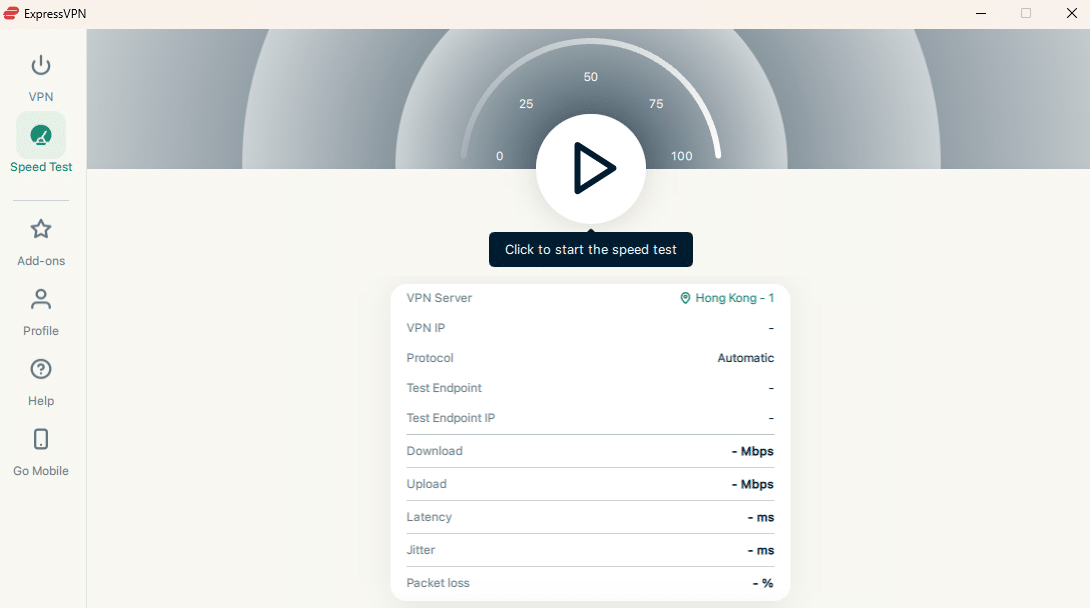
Unlike many other VPN services that require users to manually test each server for speed and latency—often wasting time without clear results—ExpressVPN makes the process simple and efficient.
With just one click on the “Speed Test” feature in the ExpressVPN app, users can instantly run tests across all available server locations. Based on the results, you can easily choose the best server with the lowest latency and fastest speeds, saving time and ensuring optimal performance.
Real-World Speed Notes
While many bloggers make unfounded VPN recommendations, I aim to provide honest, real-world results. Below is a screenshot from a recent ExpressVPN speed test. The connection was made through a Japanese server—and the results were impressive.
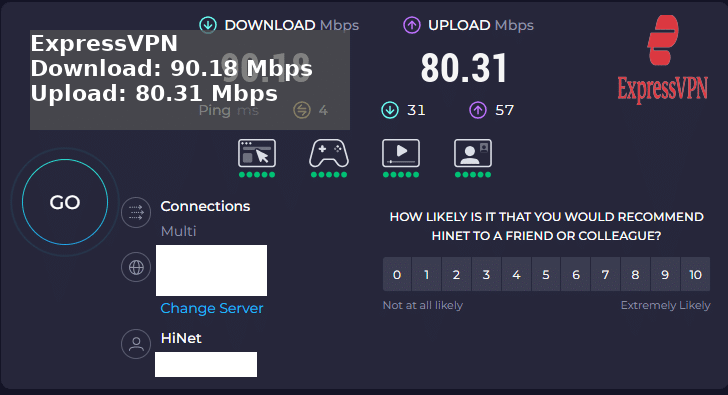
ExpressVPN Summary
ExpressVPN is a top-tier VPN provider offering exceptional levels of security and privacy. However, it comes at a slightly higher price point compared to some competitors.
Its powerful encryption makes it extremely difficult for anyone to intercept your data or compromise your device. ExpressVPN also features a kill switch, which automatically blocks all internet traffic if the VPN connection drops—helping prevent data leaks.
The service adheres to a strict no-logs policy, meaning it does not store any records of your online activity.
Bottom line: ExpressVPN delivers a premium VPN experience with high-level privacy and security features, though it may be considered a bit expensive. For users who prioritize reliability, performance, and safety, it remains one of the stronger choices on the market.
#3 Surfshark – practical for many phones and tablets
Unlimited devices · Automatic protocol switching · 30-day money-back guarantee
Surfshark: High-Quality VPN at a Competitive Price
Company Overview:
Founded in 2018 and based in the British Virgin Islands, Surfshark has quickly risen to prominence in the VPN industry. Despite being a relatively new player, it has earned widespread praise from users and cybersecurity experts alike for its reliability and innovation.
Key Features:
Surfshark supports a variety of VPN protocols, including OpenVPN, IKEv2, and their custom implementation of Shadowsocks. It uses AES-256 encryption, the highest standard in the industry, and enforces a strict no-logs policy, ensuring your online activity remains private.
Servers & Locations:
Surfshark operates 3,200+ servers in over 60 countries, offering users excellent global coverage for fast speeds and easy access to geo-restricted content.
Device Compatibility:
One of Surfshark’s standout features is its unlimited simultaneous device connections—a rare offering among VPN providers. It supports all major platforms including Windows, macOS, iOS, Android, and Linux, as well as Fire TV, Apple TV, smart TVs, gaming consoles, and routers.
Customer Support:
Surfshark offers 24/7 customer service via live chat and email. Their website also features extensive tutorials and a helpful knowledge base.
Additional Features:
- CleanWeb: Blocks ads, trackers, and malware.
- Whitelister: A split tunneling feature allowing selected apps or websites to bypass the VPN.
- MultiHop: Routes your connection through two VPN servers for enhanced security and privacy.
Pricing & Refund Policy:
Surfshark offers highly competitive pricing and backs its plans with a 30-day money-back guarantee, letting you try it risk-free.
Conclusion:
Although a newer entrant in the market, Surfshark stands out by combining top-tier security, advanced features, and unlimited device connections at an affordable price. It's a strong contender against more established VPN providers and an excellent choice for users who prioritize both privacy and value.
Surfshark is one of the better-known consumer VPN brands, especially for households that need many devices on one subscription. Its strength is convenience: apps are easy to install, device limits are generous, and obfuscation-related settings can help in some restrictive network environments.
・Enjoy Fully Automated Server and Protocol Selection
No manual setup needed—Surfshark intelligently chooses the best server and protocol for your connection, ensuring optimal speed and reliability every time.
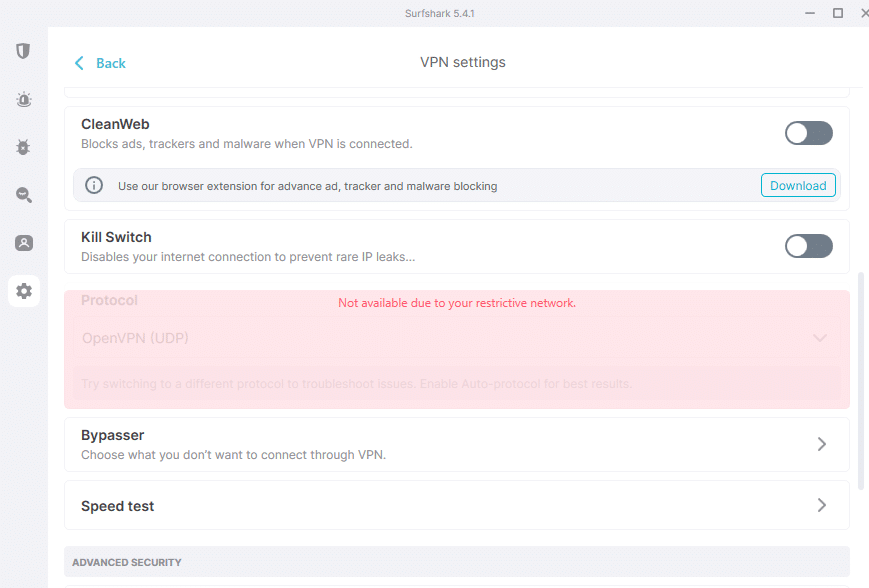
Surfshark offers obfuscation-related features for restrictive networks. Results can still vary by ISP, device and local network conditions, so it is best treated as a convenient, good-value option rather than a guaranteed fix for every connection problem.
Speed and Value Notes
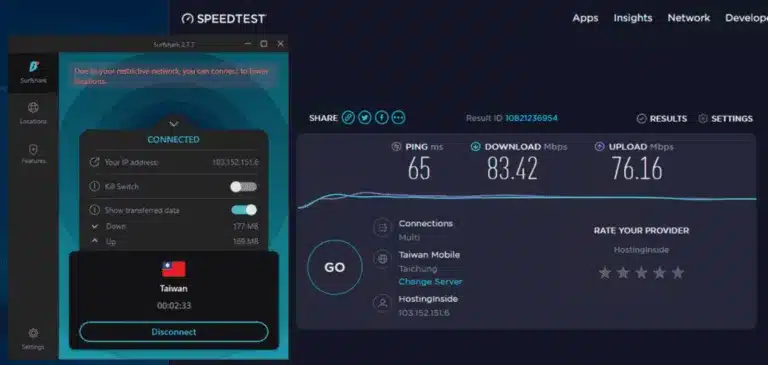
Based on real-world testing, Surfshark delivers exceptional speed when connected through its SS nodes. In head-to-head comparisons, Surfshark outperforms many competitors in terms of latency, stability, and streaming capability for users on restrictive networks.
Surfshark Feature: Unlimited Devices
Unlike most VPN providers—such as StrongVPN, ExpressVPN, or FlowVPN—which typically cap simultaneous connections at 5 devices, Surfshark allows unlimited simultaneous connections. For most individuals, 5 devices may be sufficient to cover a phone, laptop, and tablet. However, if you plan to share your VPN with family members or stream content together on multiple devices (like watching Netflix as a group), that limit can quickly become restrictive. That’s where Surfshark truly stands out.
Why Choose Surfshark?
We believe Surfshark is one of the best VPNs available today for many reasons—but one of the most compelling is its support for unlimited devices under a single subscription. This means you can protect the entire household's online activities without worrying about hitting device limits.
Since Surfshark charges a flat monthly fee regardless of the number of connected devices, it offers outstanding value, especially when compared to VPNs that charge based on the number of users or connections.
In addition, Surfshark includes a wide range of premium features such as:
- Strict no-logs policy
- Military-grade AES-256 encryption
- Built-in ad and malware blocker (CleanWeb)
Even if you're not tech-savvy, Surfshark’s intuitive apps make it easy to stay protected across all your devices.
If you're looking for a VPN solution that keeps your entire family safe online—without limitations—Surfshark is your best choice.
#4 FlowVPN – short Android compatibility test
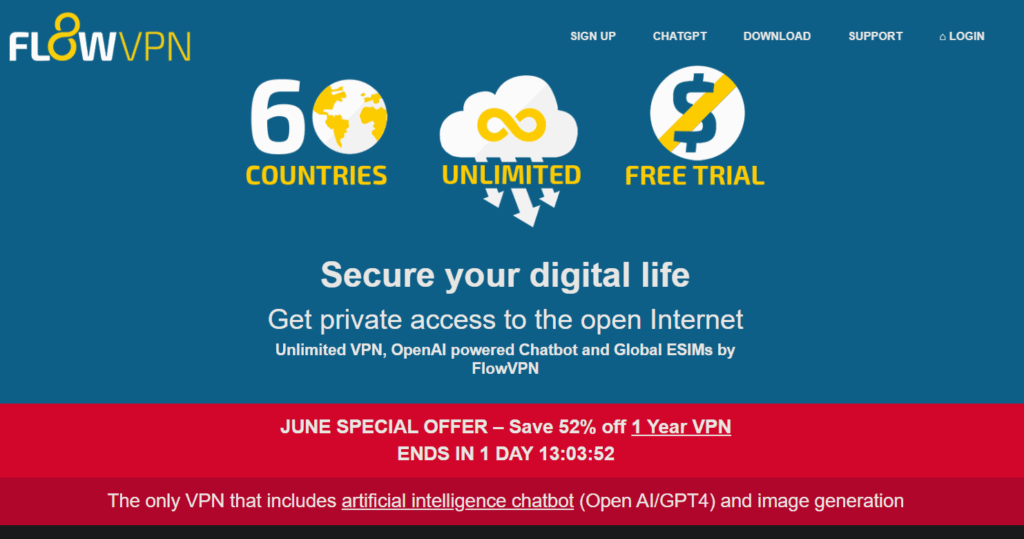
Simple setup · International payment options · 30-day money-back window · 2-day trial option
Company Background FlowVPN is a UK-based VPN provider with years of experience serving users worldwide. They're known for innovation, reliability, and expanding features beyond just VPN.
Key Service Features FlowVPN delivers secure, high-standard encryption (AES-256 and more) to protect your privacy, secure your connection, and let you access content freely across borders. It uses protocols like WireGuard, OpenVPN, IPSec, and custom options for top speed and security.
Servers & Coverage Access blazing-fast servers in 70+ countries across Europe, North & South America, Asia, Africa, and Oceania. With 100+ locations and constant network growth, you get optimized global performance for streaming, gaming, and everyday browsing.
Device Compatibility Full support for Windows, macOS, iOS, Android, plus browser extensions (Chrome/Firefox). Connect multiple devices per account (up to 10 simultaneous connections in many plans), and even set it up on routers for whole-home protection.
Customer Support Email support plus a comprehensive knowledge base with setup guides and tutorials directly on their site.

The Only True Native VPN App for Apple TV FlowVPN pioneered the world's first dedicated VPN app for Apple TV! Launched alongside tvOS 17 (which first enabled native VPNs on the platform), it lets you enjoy private, secure streaming and access servers in 70+ countries right from your living room. Perfect for unblocking content on the big screen.
FlowVPN enjoys a strong reputation in the US and beyond. It leverages OpenVPN for rock-solid encrypted connections and maintains a strict no-logs policy — your online activities stay private and unmonitored. While not the most mainstream name everywhere, it's a trusted, reliable choice for secure global access.
Bonus Features That Make FlowVPN Stand Out
- Built-in AI Chatbot FlowVPN includes an AI assistant inside its ecosystem. It is a useful extra for quick questions, writing help and everyday productivity, but the VPN itself should still be judged mainly on connection stability, app quality and privacy practices.
- AI Image Generation Describe anything (e.g., “a cyberpunk city at sunset with flying cars” or “a cat astronaut exploring Mars”), and FlowVPN's OpenAI-powered tool generates unique, high-quality images. It is a nice bonus for creators and casual users, though it should be seen as an extra feature rather than the main reason to choose a VPN.
- FlowVPN for Apple TV – Pioneer in Smart TV VPN Be among the first to experience private internet on your Apple TV. Download the app directly from the App Store (no sideloading hassle post-tvOS 17). Secure your streaming, bypass geo-blocks, and enjoy global servers from the couch.
How to Start Your Free Trial – Super Simple Steps
Step 1: Head to the Official Site Click here to access the FlowVPN free trial page.
Step 2: Sign Up Enter your email and create a strong password. Choose an authentication image (like a fun icon) for extra security.
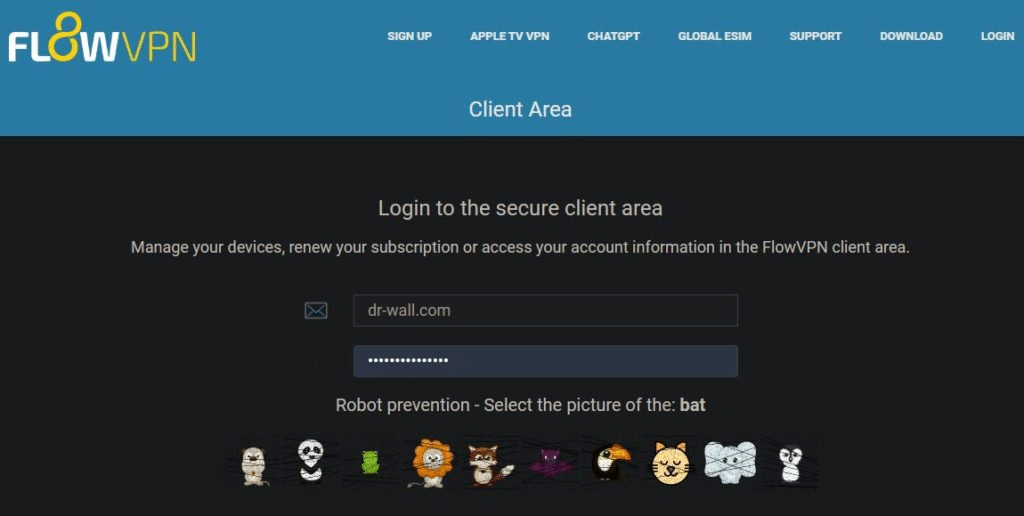
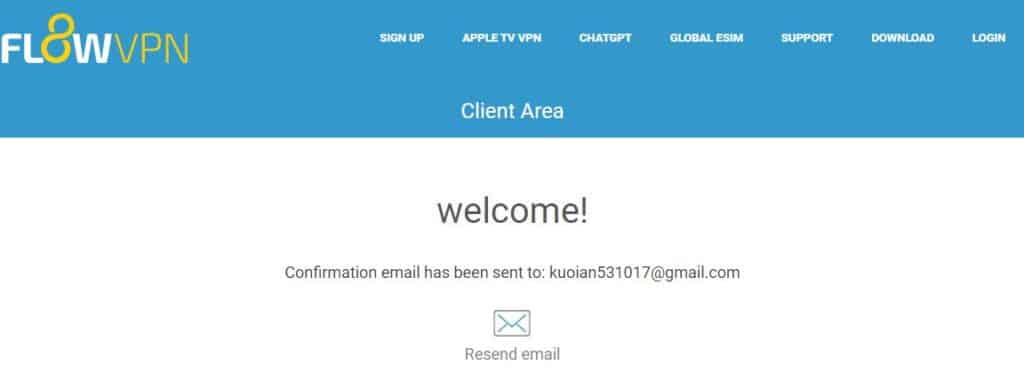
Step 3: Verify Your Email Check your inbox (or spam) for the confirmation link. Click it within a couple of minutes — if it doesn't arrive, hit “Resend Email.”

Step 4: Download & Connect Log in to your dashboard, grab the app for your device (Mac, Windows, iOS, Android, Apple TV, etc.), and connect to any server. Start browsing securely right away!
FlowVPN is a practical alternative for users who want a short trial, broad device support and a few unusual extras beyond basic VPN protection.


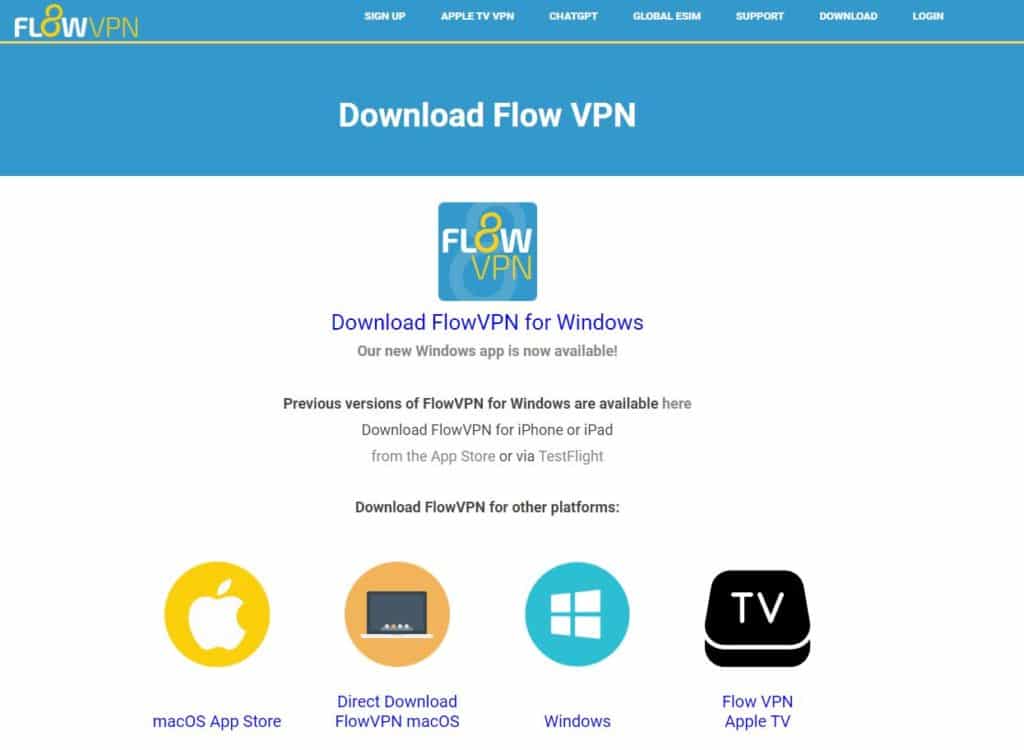
Want to test it first? Visit the official FlowVPN website and start with the available trial or money-back window before committing long term.
VPNs to Avoid on Android – Common Red Flags & Unsafe Options
VPNs and Proxy Apps We Would Treat Carefully
Some VPN and proxy apps create more risk than they solve. The main warning signs are unclear ownership, weak privacy practices, unstable apps, aggressive permissions, poor refund support and reports of real IP exposure.
| Risk signal | Why it matters | Safer move |
|---|---|---|
| Unknown company or unclear jurisdiction | You may not know who controls your traffic, logs or payment data. | Choose a provider with public policies, support channels and refund terms. |
| Free VPN with aggressive ads | Free services often need another way to make money, and that can create privacy tradeoffs. | Use a paid VPN with a trial or money-back window instead. |
| Cracked APK, unofficial installer or copied app | Modified installers can include tracking, malware or account theft risk. | Download only from the official site or official app store. |
| No refund path or no support response | If the app stops working, you may have no practical way to recover the payment. | Test before a long plan and keep screenshots of refund terms. |
For most readers, the safer path is boring but practical: use a known paid VPN, test it on your own network, keep one backup option, and avoid apps that ask for too many permissions without explaining why.
VPN Installation & Multi-Device Setup Guide: Windows, iOS, Android, Linux & More
VPN services support a wide range of devices, but the exact number of simultaneous connections depends on your provider and subscription plan. Many allow multiple devices (great for households or teams), while others limit connections or charge extra for more. Always check the terms on the official site or contact support to confirm.
Modern VPNs typically support at least 4–10 simultaneous devices across major platforms: Windows, macOS, iOS, Android, and often Linux. Here are detailed installation guides for each:
- Windows PC VPN Setup – Latest tested apps & step-by-step
- iOS VPN (iPhone & iPad) – Full guide for Apple devices
- Android VPN (Smartphones, Tablets & More) – mobile setup tips
- Linux VPN Recommendations – Hands-on guides for the top 4 options
Common Android VPN Questions & Troubleshooting
Why do some VPNs feel slow or unreliable on Android? Not all VPNs are created equal. Here are common reasons and how to choose better ones:
- Speed & Bandwidth Limits – Encryption adds overhead; free or low-quality VPNs often throttle speeds, especially during peak hours.
- Privacy Concerns – Some log activity or share data — always pick no-logs providers with audits.
- Connection Blocks – Certain networks or sites may restrict VPN traffic.
- Unstable Connections – Frequent drops or weak server performance.
- Security Risks – Outdated apps or vulnerabilities can expose data.
Tips for choosing a reliable Android VPN:
- Go with trusted providers (e.g., ExpressVPN, Surfshark, StrongVPN)
- Read the privacy policy (strict no-logs)
- Look for strong encryption (AES-256), kill switch & WireGuard
- Check server count/location for better speeds
- Test user reviews & support quality
What to do if you can't access certain sites after connecting?
- Switch servers — try a different location (closer or less crowded).
- Change protocol — test WireGuard, OpenVPN, or IKEv2.
- Check firewall/antivirus — temporarily disable to test.
- Flush DNS cache (Windows: ipconfig /flushdns; Mac: sudo killall -HUP mDNSResponder).
- Reinstall the app.
- Contact support — they often have quick fixes.
Which servers give the fastest VPN speeds? Speed depends on several factors:
- Proximity – Connect to nearby servers for lower latency.
- Server Load – Avoid overloaded ones; most apps show load %.
- Bandwidth – Paid plans usually offer unlimited/high bandwidth.
- Protocol – WireGuard is often fastest; UDP > TCP.
- Your ISP/Network – Poor local Wi-Fi or ISP throttling can affect results.
Tips for max speed:
- Choose closest/low-load servers
- Switch protocols (WireGuard usually wins)
- Test multiple servers
- Upgrade your home internet if needed
Can I use my VPN subscription on other devices (PC, tablet, etc.)? Yes — most VPNs let you install and use the same account on multiple devices (computers, tablets, phones).
Steps:
- Download the official app for your device from the provider’s site or app store (Windows, macOS, iOS, Android, etc.).
- Log in with your credentials.
- Select a server and connect.
Check your plan for simultaneous connection limits (e.g., Surfshark = unlimited; others 5–10). Multi-device plans are common and often no extra cost.
Can I run VPN on PC and phone at the same time? Yes — most providers support simultaneous connections across devices.
Steps:
- Install apps on both PC and phone.
- Log in on each.
- Connect independently — your traffic on both will be protected.
Why does my Wi-Fi speed drop when using VPN? Common causes:
- Encryption overhead
- Longer routing path (device → VPN server → destination)
- Server load or bandwidth limits
- Added latency from extra hops
- Possible ISP throttling on VPN traffic
How to improve VPN speed:
- Switch to a closer/less loaded server
- Try faster protocols (WireGuard)
- Test different providers
- Contact support for optimization tips
Final Thoughts VPN performance evolves over time — what works best depends on your location, ISP, and needs. Always start with a free trial or money-back guarantee to test yourself. I personally recommend ExpressVPN (fastest), Surfshark (unlimited devices), StrongVPN (reliable), and FlowVPN (unique extras like AI tools).
Have questions? Drop a comment — happy to help!
Ready to upgrade your online security? Visit the official sites below and start your risk-free trial today:
- StrongVPN →StrongVPN for Android – straightforward paid starting point
- ExpressVPN → ExpressVPN for Android – premium travel and recovery option
- Surfshark → Surfshark for Android – useful for many phones and tablets
- FlowVPN → FlowVPN for Android – short compatibility test
Stay safe, stay private, and enjoy the full internet!